

How to change your 11-digit phone number on Facebook.
The change in phone number prefixes will undoubtedly have a significant impact on users' Facebook accounts. How can this be mitigated?
According to Decision No. 798/QD-BTTTT of the Ministry of Information and Communications, from September 15, 2018 to November 14, 2018, telecommunications operators will convert 11-digit phone numbers to 10-digit numbers.
Most major services like Facebook, Google, and Viber support two-factor authentication via text message. When changing your phone number, users may not receive the OTP code or login alerts via phone. Therefore, you should proactively change your phone number on Facebook to avoid not receiving verification codes, being unable to log in, or being unable to recover your account if it is hacked.
Please note that users should only update their Facebook account after their phone number has been successfully transferred by their mobile carrier.
First, open the Facebook app on your smartphone, tap the menu icon in the upper right corner, find Settings & Privacy > Settings.
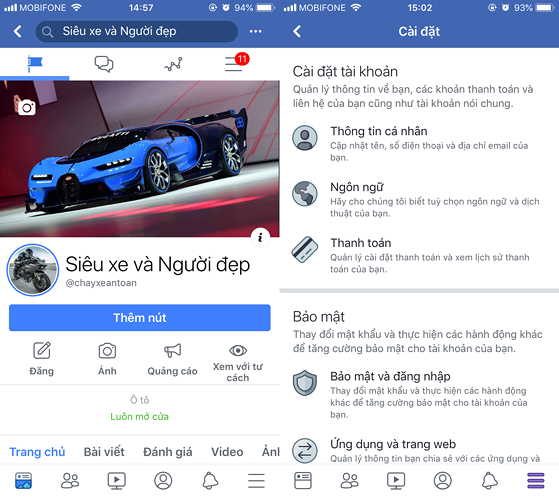 |
| Access the menu within the Facebook app. Photo: Minh Hoang |
Next, go to Personal Information > Phone Number, and click Remove to delete your old phone number (enter your Facebook password when prompted). Then, simply click the Add Phone Number option and enter your new phone number (the one with the changed area code from your network provider). Facebook will then send a verification code to your phone; enter it into the empty field to confirm.
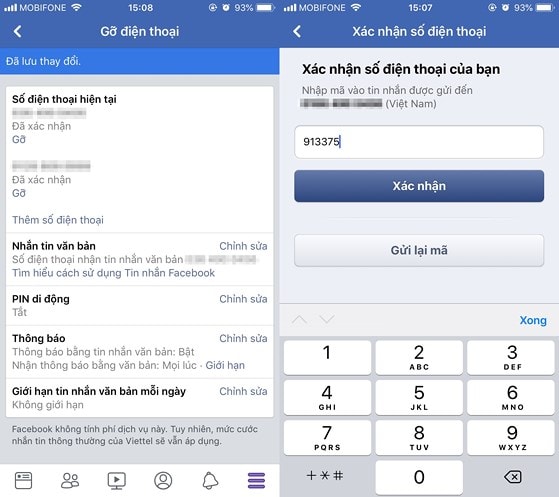 |
| Update your phone number on Facebook. Photo: Minh Hoang |
Similarly, if you're using a computer, open your browser and log in to your Facebook account. Then go to Settings or click directly on the link.https://www.facebook.com/settingsThen, go to the Mobile section and remove the old number, adding a new one as described above. Note that after adding the phone number, you need to confirm it again before using it.
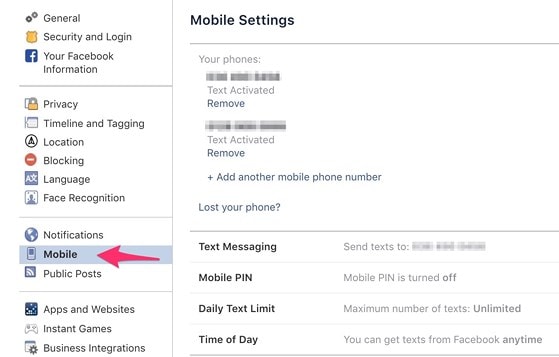 |
| Change your Facebook phone number via your browser. Photo: Minh Hoang |
For Facebook, you only need to change your phone number once, and all your personal information will be updated.
In addition, users should also update all phone numbers in their contact list by installing one of the three applications: My MobiFone, My Viettel, or My VNPT on their smartphone. Next, click on the "Convert 11-digit numbers to 10-digit numbers" option and follow the instructions until the process is complete.
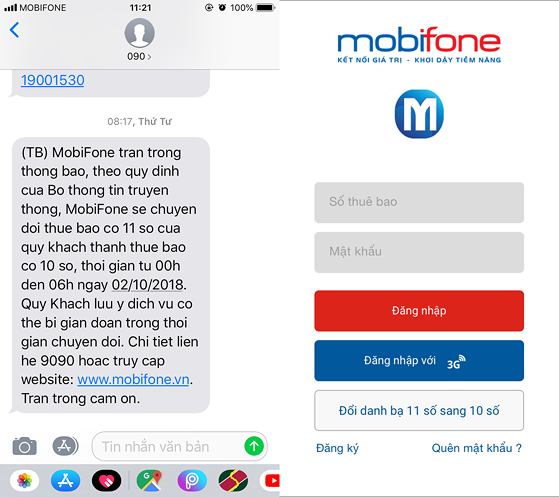 |
| Update all phone numbers in your contacts using your carrier's app. Photo: Minh Hoang |
Please note that the names and locations of the options may vary depending on the application you are using. Compared to third-party applications, these software programs only automatically update the phone numbers that have been converted by the network provider, not all numbers.
Currently, some banks have started sending notifications and suggesting ways for you to update your phone number from home. For some banks, individual users only need to send a text message to register for a phone number change from home, and the bank will handle the rest. Conversely, organizations must go directly to a branch to update their information. Readers interested can refer to the article for more information.How to change the phone number linked to your bank account from home.at the addresshttp://bit.ly/sdt-ngan-hang.
Hopefully, with the tips introduced above, readers can avoid situations where they don't receive verification codes, can't log in, or can't recover their accounts when they are hacked.
Please note that the network provider will maintain both the old and new phone numbers for 60 days. After November 15, 2018, the old phone number will no longer be able to receive account verification codes. Therefore, as soon as you have been switched to the new number, please update the information for your important accounts.