

Phishing emails are becoming increasingly sophisticated – How can you avoid being scammed?
Phishing emails are becoming increasingly sophisticated, making it easy for many people to fall for them without realizing it. Just one click can cost you data, money, or control of your accounts.
No matter who you are, what you do for a living, or where you are in the world, the likelihood of receiving spam emails or phishing messages is almost certain. In fact, you may have hundreds of such messages quietly sitting in your spam folder as you read this.
The best email providers and antivirus software available today can help you filter out most suspicious emails. However, no system is perfect. Therefore, you need to equip yourself with the skills to identify phishing emails to avoid falling into traps. Here are some tips to help you do just that.
Always verify the sender's identity.
If you suddenly receive an email from an acquaintance you weren't expecting, treat it as suspicious. Normally, emails from friends or family are related to an ongoing conversation, or at least have context. So, if an email arrives unexpectedly, especially with an attached link, stop and ask yourself: "Is this really from them?"
One common tactic used by hackers is to gain control of email accounts and then send spam to all of the victim's contacts. These emails often contain seemingly harmless links, but are actually traps designed to install malware or steal personal data.
The good news is you can completely avoid this situation simply by verifying. Quickly call or text the person and ask, "Did you just send me an email?" If they respond with a confused look, you have your answer.
Additionally, don't just look at the name displayed in the email. Carefully check the actual sender address behind that name. Hackers love to impersonate familiar brands to trick you.
Always check the links in emails.
The safest way to handle suspicious emails is to never click on any links, even if you think you know the sender. That said, that feeling of "familiarity" is sometimes just a clever disguise.
Clicking on a misplaced link in an email is how many people have fallen victim to sophisticated phishing campaigns.
However, if you're certain the email is legitimate and shows no signs of phishing, there's still a way to check the link before clicking on it. Simply hover your mouse over the link in the email. A small box will appear, usually in the bottom-left corner of your browser or email application, showing the actual address the link leads to.
With suspicious links, the telltale signs are often obvious: the URL looks strange, is long, messy, or contains a domain name that doesn't match the website you're expecting. This is usually a clear indicator of a malicious website.
In short, remember that in the online world, a careless click can open the door to risk. So it's best to check carefully before clicking.
Spelling errors - a classic sign of phishing emails.
One of the easiest ways to spot a suspicious email is through spelling errors, confusing punctuation, or unusual word choices. Many phishing campaigns originate from places where English isn't the primary language, and this is often evident in awkward sentences, grammatical mistakes, or the use of words completely out of context.
Of course, everyone can make typing mistakes, even emails from colleagues or friends are not immune to minor errors. But if you're reading an email where the sentences sound like they were written while drunk, or require you to reread it to understand the meaning, then you're almost certainly looking at a phishing email.
A little tip: if you chuckle or feel like "something's not quite right" while reading, trust that feeling. Mark it as spam and get on with your work. In the digital world, sometimes intuition is the most reliable shield.
Be wary of emails from large companies.
Unless you're using a paid service, it's very rare to receive personalized emails from Facebook, Apple, or Google.
These tech giants don't send you emails just to "chat" or give vague warnings that "there's a problem with your account."
If they really need to contact them, it's usually to notify them about a payment, a security change, or an unusual login.
And regardless of who you are, you should enable two-factor authentication (2FA) for all your online accounts. It's one of the strongest layers of protection against intruders.
Most large companies will never ask you for your password via email, and they usually won't embed clickable links either. Genuine emails are typically purely for informational purposes.
If you want to verify, open your browser and log directly into your account on the official website; never use the shortcut in your email.
Text messages are even more dangerous than emails.
Admittedly, sometimes messages like "Your Amazon package is delayed, click here to check" genuinely pique people's curiosity. Especially when you have an order waiting to be delivered, such notifications easily pique your interest. But more often than not, these are just cleverly designed traps to trick you into clicking on malicious links.
Compared to email, text messages are even more dangerous. The reason is that you can almost never see where the link actually leads unless you know how to preview the content.
Modern smartphones offer image previews, but advanced scams have surpassed that feature. The result is a seemingly harmless message that's actually a trap without warning.
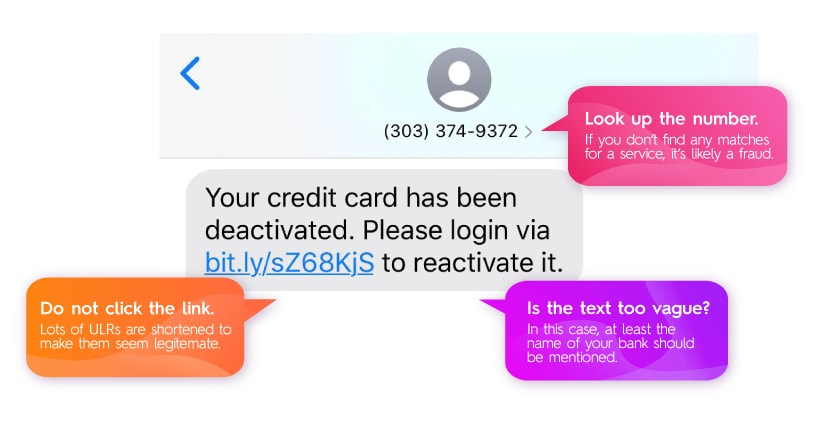
If you receive a message about your order, bank account, or any service you've used, ignore the message. Instead, open your browser and go directly to the official website (e.g., Amazon.com). If something is genuinely delayed, you'll see it in your order history.
More subtle cases that might make you suspicious, such as messages using your exact name, or content that sounds "related to your real life," should also be viewed with caution.
Do not click on links if you are unsure of the source. If the message comes from someone you know, verify it through another channel, such as calling or texting them privately, to ask if they actually sent it.
And finally, ignoring it is also a smart option. Nobody loses anything by ignoring a suspicious message. But clicking on the wrong link? The price could be your entire digital identity.
In short, the best antivirus software for Windows today can do a great job of filtering out phishing emails and warning you of potential threats. But no matter how smart the technology, most scams and malware attacks only succeed when you click on the link embedded within them.
Zero-click malware attacks still exist today, where victims can be compromised without doing anything. However, these attacks are extremely sophisticated, expensive, and usually target high-profile individuals such as government officials, investigative journalists, or other highly valuable figures.
For most of us, the average user, the danger still comes from clicking on suspicious links in emails or messages out of curiosity.
Therefore, the key principle is: if you're not sure, don't click. No matter how appealing a link looks, no matter how much the content taps into your emotions, your safety is always worth more than a little curiosity. Don't let an accidental click become your ticket to hackers.