

The quickest way to block your Techcombank credit card.
How to quickly block a Techcombank credit card, in case the user loses their card or needs to block it for any other reason.
When should I block my Techcombank credit card?
During use, there are many situations where you need to block your Techcombank credit card to avoid risks.
For example, this can happen when the card is lost or misplaced, the PIN is compromised, unusual transactions occur, or when you no longer need to use the card.
Additionally, if card service fees increase, blocking the card is also a cost-saving option.
Block your card directly on the Techcombank Mobile app.
The Techcombank Mobile app is the fastest way for customers to instantly block their cards without contacting the call center.
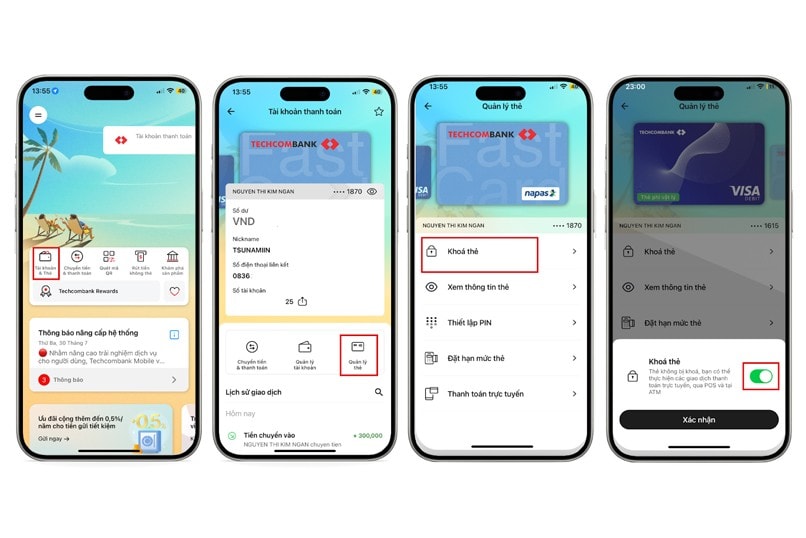
After logging in, select Accounts & Cards, then click Manage Cards > Lock Card. The system will display a successful lock notification on the screen. This process can be applied to both VISA credit cards and Techcombank ATM cards.
Block your Techcombank card via hotline.
In addition to using the app, customers can also call 1800 588 822 for assistance in blocking their cards. When calling, you need to provide basic information such as your card number or account number, and your ID card/citizen identification number for verification. After verification, the call center staff will block the card immediately as requested.

In any case, blocking your Techcombank credit card should be done as soon as possible to minimize the risk of losing money or having your information leaked.
Whether customers choose to lock their account via the app or call the hotline, they should have their personal information ready to ensure a quick process.