

Rufus and Ventoy are not supported for installing Windows 11 on PCs via USB drives.
This analysis examines two popular tools for creating Windows 11 installation USB drives on machines that don't meet TPM, Secure Boot, or minimum RAM requirements. Rufus offers the option to bypass the requirements and create a local account; Ventoy launches ISOs directly and supports multiple ISOs. Note the POPCNT barrier from version 24H2.
Windows 11 tightens hardware requirements (TPM 2.0, Secure Boot, minimum RAM), making it impossible to install through official channels on many older machines. To overcome this, users often create special installation USB drives using third-party tools. This article analyzes two widely used solutions, Rufus and Ventoy, along with alternatives such as Tiny11 Builder and unattended answer files, as well as the significant limitations of Windows 11 24H2.
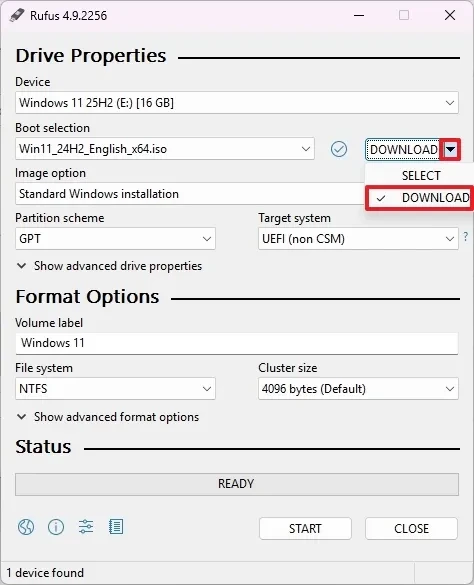
What does Rufus do beneath its interface?
Rufus is a popular tool for creating Windows 11 installation USB drives, thanks to its built-in options for overcoming hardware limitations. During the USB creation process, Rufus allows you to:
- Remove the TPM 2.0, Secure Boot, and minimum RAM requirements (the option "Remove requirements for 4GB+ RAM, Secure Boot, and TPM 2.0").
- Remove the requirement for an online Microsoft account, and you can automatically create a passwordless local account (the "Create a local account with username" option).
- Prevent the system from automatically enabling BitLocker or Device Encryption, helping to avoid unintended encryption after installation.
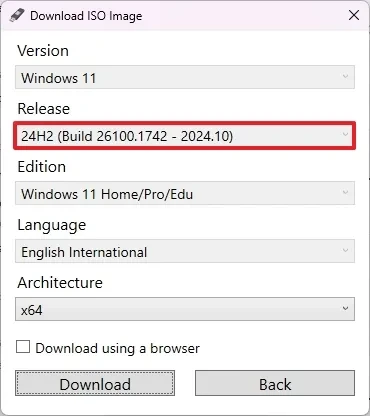
Regarding installation sources, Rufus supports directly downloading the Windows 11 ISO from the interface (Download option), then allows you to select the version, language, and x64 architecture before burning it to a USB drive. These steps unify the ISO preparation and USB burning process into a single, closed loop, reducing manual operations.
Ventoy turns USB drives into versatile "ISO boot drives".
Ventoy takes a different approach: it turns a USB drive into a bootable environment that can directly load ISO files without extraction. After installing Ventoy onto the USB drive, users simply copy the Windows 11 ISO to the USB; upon booting, the Ventoy environment will display a list of ISOs to choose from for installation. By default, Ventoy applies the necessary configuration to overcome installation requirements on unsupported hardware.
- Supports multiple ISOs on the same USB drive: can contain Windows 11, 10, 8.1, 7, and Linux.
- When a new version of Windows is available, simply copy the new ISO file to the USB drive; there's no need to reformat it.
Alternatives: Tiny11 Builder and answer file
Besides Rufus and Ventoy, there are two other approaches:
- Tiny11 Builder: A script for building custom Windows 11 ISOs, removing bloatware and hardware requirements for installation on incompatible devices.
- Unattended answer file: Upload this along with your standard USB installer to install Windows 11 without bloatware on unsupported hardware.
These two options focus on minimizing images and automating installation, suitable when control over ISO content and deployment processes is required.
Technical advantages and practical benefits
- Extending device lifespan: enabling older devices to experience Windows 11 without needing hardware replacement.
- Simplified process: Rufus integrates ISO loading and USB burning; Ventoy eliminates the ISO extraction step and manages multiple copies on a single USB.
- Flexible customization: Rufus allows you to skip hardware requirements, Microsoft accounts, and bypass device encryption; Tiny11 Builder and answer file reduce bloatware and automate installation.
Limitations and risks that need to be understood
- Unsupported status: Microsoft does not support installing Windows 11 on incompatible hardware; system updates can be downloaded but are not guaranteed to work, and the experience may differ from supported systems.
- CPU hurdles from Windows 11 24H2: it's virtually impossible to install if the processor doesn't support POPCNT. Additionally, the chip needs to support SSE4.2 (Intel) or SSE4A (AMD). This requirement primarily affects CPUs released before 2007.
Short comparison table
| Solution | approach | Exceeds hardware requirements | Bloatware | Multiple ISOs/no reformatting required. |
|---|---|---|---|---|
| Rufus | Create a bootable USB drive, or download the ISO directly. | Options include disabling TPM 2.0, Secure Boot, and RAM; removing the Microsoft account; and creating a local account. | Not specified | Not specified |
| Ventoy | Turning a USB drive into an ISO boot environment | By default, the necessary configuration is applied for installation on machines that do not support it. | Not specified | Yes; copying a new ISO doesn't require formatting. |
| Tiny11 Builder | Custom ISO creation script | Remove hardware requirements | Remove bloatware. | Not specified |
| Answer file | Automated reply files are usually included with USB drives. | Install on unsupported hardware. | Install without bloatware. | Not specified |
When to choose something
Prioritize speed and efficiency.
If you want a straightforward process with fewer manual steps, Rufus is a good choice thanks to its integrated ISO loading and options that go beyond typical installation requirements.
Flexibility and multi-operating system are prioritized.
If you need a USB drive that can be used for multiple Windows and Linux distributions, allowing you to add/remove ISOs flexibly without reformatting, Ventoy is a reasonable choice.
Prioritize minimalist images.
When the goal is to reduce bloatware and control ISO content, Tiny11 Builder or answer file is more suitable.
Future and recommendations
The trend with Windows 11 is to increase platform requirements, evident from version 24H2 with POPCNT. This significantly limits installation possibilities on very old CPUs. In this context, Rufus, Ventoy, Tiny11 Builder, and answer files remain effective tools for devices nearing the threshold, but users need to accept the risks associated with support and updates. For systems that are too old (especially those pre-2007), practical installation possibilities will be very limited.