

The hidden power of the @ symbol in Excel formulas
The @ symbol in Excel is the implicit intersection operator, which helps formulas return a single value instead of overflowing. Understanding it is key to mastering dynamic arrays.
Background: From implicit interfaces to dynamic arrays
Before delving into the @ symbol, it's essential to understand two core concepts in Excel: implicit intersection and dynamic array spill. Implicit intersection is an older Excel mechanism that automatically reduces a resulting array to a single value, usually the value in the same row as the cell containing the formula.
In versions of Excel prior to 2021, when a formula references a data range (for example:=B2:B5*C2:C5Excel will silently perform the implicit intersection and only return one result in the formula input cell. The user must then manually drag the fill handle or use the CSE array formula (Ctrl+Shift+Enter) to apply the calculation to the remaining rows.
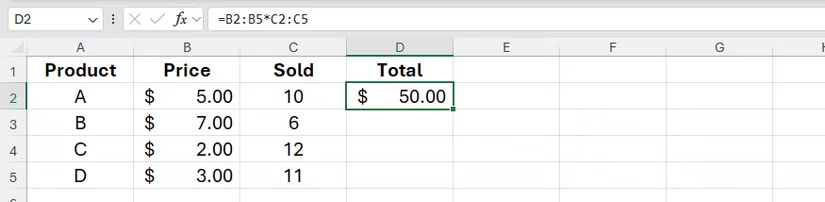
However, with the introduction of dynamic arrays in modern versions of Excel, the default behavior has changed. Formulas now automatically "overflow" the result across multiple cells, creating a result area surrounded by a blue border. In essence, implicit intersection and overflow are two opposing mechanisms: one returns a single value, the other returns an entire result array.
The role of the @ symbol in Excel formulas
The @ symbol is the implicit intersection operator, used to force Excel to return a single value from an array or range of data, instead of allowing the result to automatically overflow across multiple cells. This role becomes particularly important in dynamic array environments.
Automatically insert into a Data Table (Excel Table)
When working with formatted tables (Excel Tables), users will frequently see the @ symbol appear. When you create a formula in a column and reference other columns in the same table, Excel will automatically insert the @ symbol before the column name.
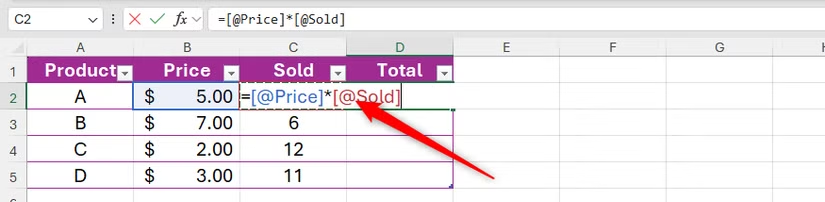
For example, in cell D2 of a table, the formula for multiplying two cells in the same row would look like this:=[@Quantity]*[@Price]The @ symbol here ensures that the formula only retrieves values from the "Quantity" and "Price" columns on the same row D2, then automatically applies the same logic to the remaining rows in the table. This helps the formula always perform calculations accurately at the row level.
Manual control with regular data areas
In versions of Excel with dynamic arrays, if you want a formula to work the old way (returning only one value), you need to manually add the @ character. For example, to prevent the formula from working.=B2:B5*C2:C5create errors#SPILL!Or if it overflows into multiple cells, you can change it to=@B2:B5*@C2:C5.
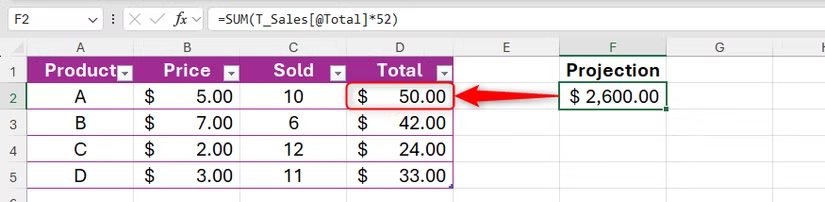
This is useful when you need to maintain consistency with older versions of Excel or when you intentionally want to apply a row-by-row calculation model instead of processing the entire data array at once.
Special cases and other applications
Besides its role as an operator in formulas, the @ symbol also appears in several other situations.
Ensure backward compatibility.
If you open an Excel file created in an older version (without dynamic arrays) and that file contains legacy array formulas (CSE), the newer version of Excel will automatically add the @ symbol to the formula. This is to ensure the formula continues to function as originally designed, returning a single result instead of overflowing across multiple cells.
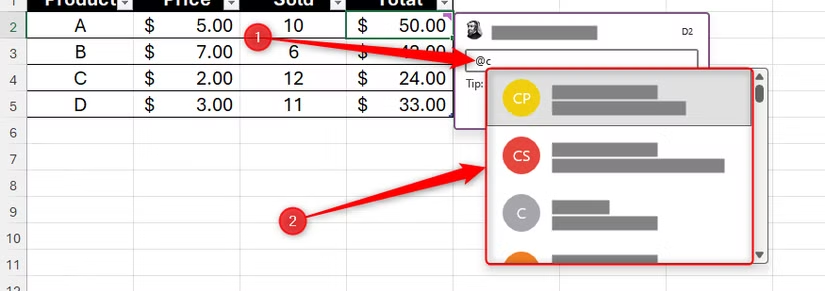
Tag contributors in comments.
In Excel for Microsoft 365 and Excel for the web, the @ symbol is used to tag other users in comments. By typing @ followed by the name or email address of someone who has access to the file, you can send them a direct message, improving teamwork efficiency on the same spreadsheet.
Mastering the workings of the implicit @ operator is a crucial skill for mastering formulas in both traditional Excel environments and modern versions that support dynamic arrays, enabling users to manipulate data more accurately and efficiently.