

Tips to speed up your Xiaomi phone for smooth performance in just a few steps.
Restore performance to your Xiaomi, Redmi, and POCO phones by clearing the system launcher cache to remove junk data that slows down your device.
After a period of use, Xiaomi, Redmi, and POCO phones often show signs of slowing down or becoming less responsive. One of the simplest yet most effective solutions to fix this is to clear the system launcher's cache. This method removes accumulated digital data without risking hardware damage or user data loss.

Why are Xiaomi phones becoming slow?
Launcher applications manage the interface and home screen. Over time, they accumulate a large amount of information in their cache, leading to problems such as:
- The app takes a long time to load.
- The transition effects on the home screen are laggy.
- Multitasking efficiency has decreased.
- Battery consumption increases because the system has to process a lot of redundant data.
The good news is that this performance drop is only temporary and can be quickly resolved through system settings.
Instructions for clearing the cache for each device model.
Depending on the Xiaomi sub-brand you are using, the steps may differ slightly in the launcher's name.
For POCO phones
- OpenSetting.
- Go to the sectionApplication(Apps) orApplication management.
- Find and select the application with the namePOCO Launcher.
- Click on the itemStorage(Memory).
- SelectClear cache.
- Restart your device to apply the changes.
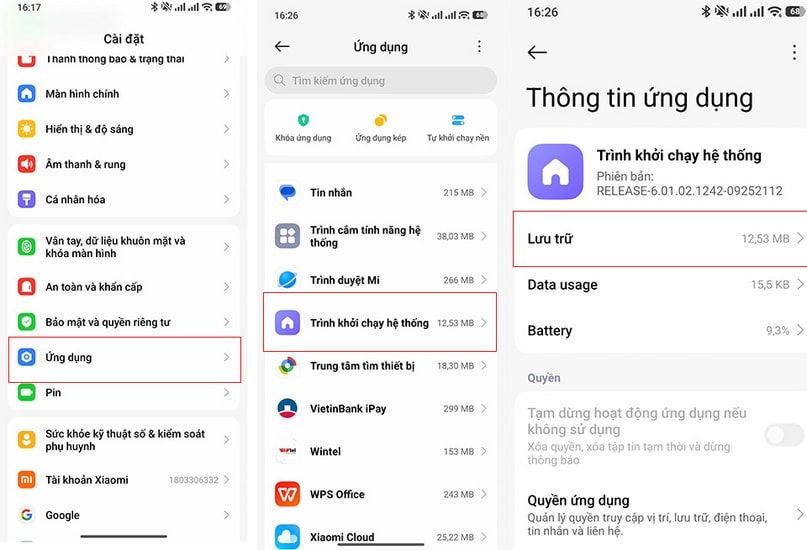
For Xiaomi and Redmi phones
- AccessSetting(Settings).
- Select itemApplication(Apps) orApplication management.
- Keyword searchSystem Launcher(System Launcher)
- Click on the itemStorage(Storage).
- SelectClear cache(Clear cache).
- Restart your phone.
Benefits of regular maintenance
Clearing the launcher cache not only provides an immediate speed boost but also offers several long-term benefits for your device:
- Optimize RAM capacity:Freeing up temporary memory helps the device handle multitasking better.
- Save battery power:The system operates more smoothly, reducing the load on the processor.
- System stability:Minimize instances of applications crashing or freezing unexpectedly.
To keep your phone in optimal working condition, users should perform this operation periodically, approximately once every 1-2 months.