
11 helpful tips to keep your Android phone safe.
With millions of attractive apps and features, Android phones offer us countless conveniences. However, these conveniences also come with security risks. So how can we enjoy these benefits while ensuring our safety?
Let's acknowledge the fact that our smartphones sometimes act like secret archives, containing far more sensitive information than we realize.
From private messages and work emails to personal contacts and crucial financial information like bank account passwords and online payment data, your Android phone holds virtually your entire digital life.
Therefore, securing your Android device is not just an option, but a top priority to protect both your personal data and your safety in today's digital world.
1. Avoid connecting to insecure networks.
Public Wi-Fi networks, such as those in cafes or airports, are free and convenient but pose significant risks because they often lack encryption, making it easy for hackers to infiltrate and steal data.
For that reason, we should try to avoid using public Wi-Fi whenever possible. When you need internet access while on the go, prioritize using mobile data, even if it costs more, because it's safer.
However, in situations where you are forced to use public Wi-Fi, you should turn on a virtual private network (VPN) to protect your connection. VPNs not only encrypt data but also mask your IP address, adding a strong layer of security and minimizing the risk of cyberattacks.
2. Regularly review and manage application permissions.
When installing an app or game for the first time, we often hastily grant permissions without careful consideration. With the large number of apps on our phones, it's easy to forget which access permissions we've agreed to. Therefore, we should develop the habit of periodically checking the access permissions of each app.
For example, we should regularly check which apps have access to our location, camera, or microphone. This not only helps us control our personal data but also prevents unnecessary apps from collecting excessive information, thereby protecting our privacy more effectively.
3. Always keep the "Find My Device" feature enabled.
The "Find My Device" feature is one of the most important security tools on Android, helping us maintain control of our devices even in the worst-case scenarios. This feature allows us to pinpoint our device's location on a map with high accuracy and even make calls to locate it more easily if it's lost nearby.
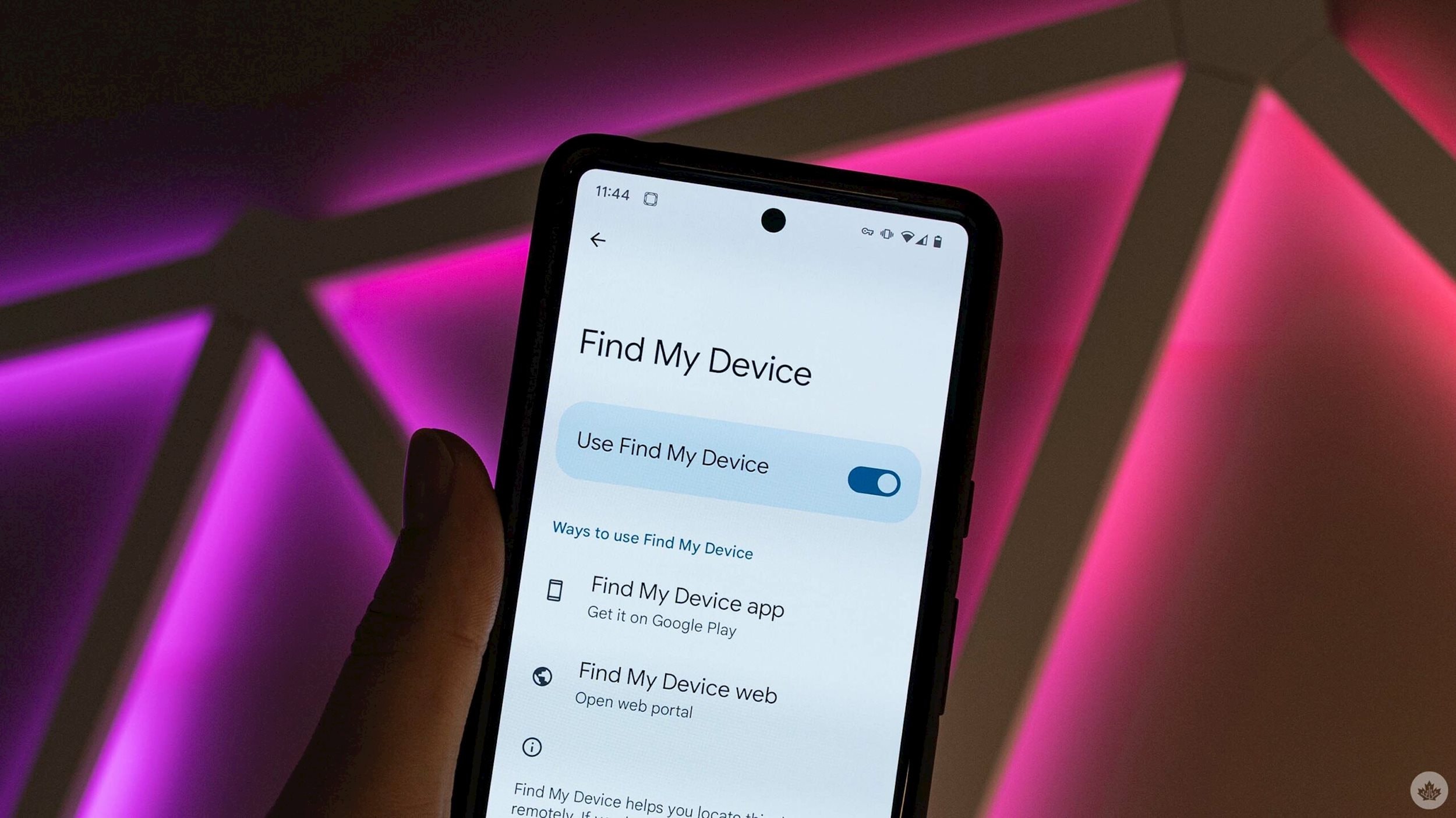
In the event of a phone theft, we can use this feature to remotely lock the phone, prevent unauthorized access, and, if necessary, wipe all personal data to ensure that important information does not fall into the wrong hands.
Even though we already protect our phones with strong screen lock passcodes, having the added "Find My Device" feature provides peace of mind that data is always protected, no matter what happens to the device.
4. Enable the "Theft Detection Lock" and "Offline Lock" features.
When traveling to unfamiliar cities or crowded neighborhoods, one of the biggest worries is the risk of having your phone stolen. Fortunately, Google's "Theft Detection Lock" feature helps alleviate this concern to some extent.
When activated, this feature uses advanced sensors and artificial intelligence (AI) to monitor unusual device movement. If it detects behavior similar to someone snatching the phone and running away, the system will immediately activate lock mode, preventing any unauthorized access.
Additionally, we should always maintain the "Offline Lock" feature as an extra layer of security. This feature intelligently detects unusual activity, such as prolonged internet disconnections or multiple incorrect password entries. Upon detecting such suspicious activity, the device will automatically lock to protect personal data.
5. Disable "Quick Settings" access from the lock screen.
Another measure we should take to protect our phones is to disable "Quick Settings" access from the lock screen. This ensures that even if someone gets hold of your device, they cannot interfere with important functions, such as enabling airplane mode, turning off mobile data, or disabling location services.
This feature is especially useful in worst-case scenarios, such as accidentally dropping your phone and it falling into the wrong hands. It gives you extra time to use other security tools like "Find My Device" to lock or locate your phone before they have a chance to do anything further.
6. Always use "Safe Browsing" mode.
To protect your Android phone from malicious websites and dangerous downloads, you should enable "Safe Browsing" mode. This feature acts as a protective shield, blocking phishing websites and malicious content that could endanger your device.

Photo: Internet.
By default, Chrome's "Safe Browsing" mode is set to standard protection, sufficient to warn about common risks. However, we should switch to advanced protection to enhance security, providing optimal protection against more sophisticated online threats. With this mode, we can browse the web with peace of mind without worrying about potential risks.
7. Avoid suspicious links and attachments.
A simple but extremely important habit that helps us avoid countless potential risks is to not click on suspicious links or open attachments from unknown sources.
Whether it's an email, text message, or social media post, we should always be cautious before interacting with any unfamiliar content. It's important to carefully check the sender's information and pay attention to unusual signs such as spelling errors, unprofessional email structure, or suspicious website addresses (URLs). These small details are often warning signs of scams or fraudulent schemes.
8. Scan your phone for malware regularly.
Although we should always be cautious about everything we download, nothing is absolutely guaranteed to be safe. That's why we should perform regular malware scans on our Android phones, just like we scan our personal computers for viruses.
These scans help us detect potential threats, from malware to hidden applications that might not be immediately apparent. This proactive approach not only allows us to address risks early, but also maintains smooth performance and device security. It's a simple yet essential step in protecting user data and experience.
9. Use NFC technology securely when unlocking the device.
Near-Field Communications (NFC) technology has brought significant convenience to our daily lives, enabling quick payments with just a touch, even without unlocking the phone. However, for enhanced security, we should enable the "Require device unlock" option when using NFC on Android phones.
This feature acts as an extra layer of security, ensuring that no one can exploit or use NFC on our devices without unlocking them. Thanks to this, we can confidently enjoy the convenience that NFC offers without worrying about potential security risks.
10. Only download apps from the Google Play Store and use Google Play Protect.
Unlike iPhones, Android offers flexibility in downloading apps, even from third-party sources. However, the security risks associated with unofficial sources often outweigh the benefits. Therefore, we should always prioritize using apps from the Google Play Store, where apps are thoroughly vetted by Google for security and compliance before release.
To enhance protection, we should also enable Google Play Protect on our phones. This feature automatically scans installed apps and monitors device activity to detect any signs of malicious behavior.
When a security threat is detected, it immediately sends an alert so we can address it promptly. Thanks to this, users can enjoy the diverse Android ecosystem while keeping their devices secure.
11. Always keep your device's software updated.
Android updates, whether system updates or security patches, play a crucial role in patching potential vulnerabilities that hackers or malware could exploit. They not only improve performance but also strengthen the protection of our devices.
Therefore, whenever you receive a notification about a new software update, you should prioritize it and install it immediately. This is a simple but effective way to keep your phone safe and running smoothly.
This also applies to app updates. Always keep automatic updates enabled on Android, ensuring you always receive bug fixes, performance improvements, and security patches automatically without needing to worry or manually intervene. This habit not only saves time but also plays a crucial role in maintaining a high level of security for your device.
In summary, keeping your Android phone safe is the result of a combination of conscious security practices and making the most of built-in features. From enabling Safe Browsing mode and only downloading apps from trusted sources to always keeping your software updated, every small step contributes to a solid layer of protection, helping our devices stay away from potential threats.


