
How to easily hide Facebook video descriptions to watch the full video.
Discover Facebook's Clear Mode feature, which hides entire long descriptions and captions, preventing the subject and face from being obscured when watching videos on your phone.
The description on Facebook videos includes the title, caption, hashtags, and links added by the uploader. However, when viewed on a phone, this text often takes up a large area, obscuring faces or other important details in the frame.
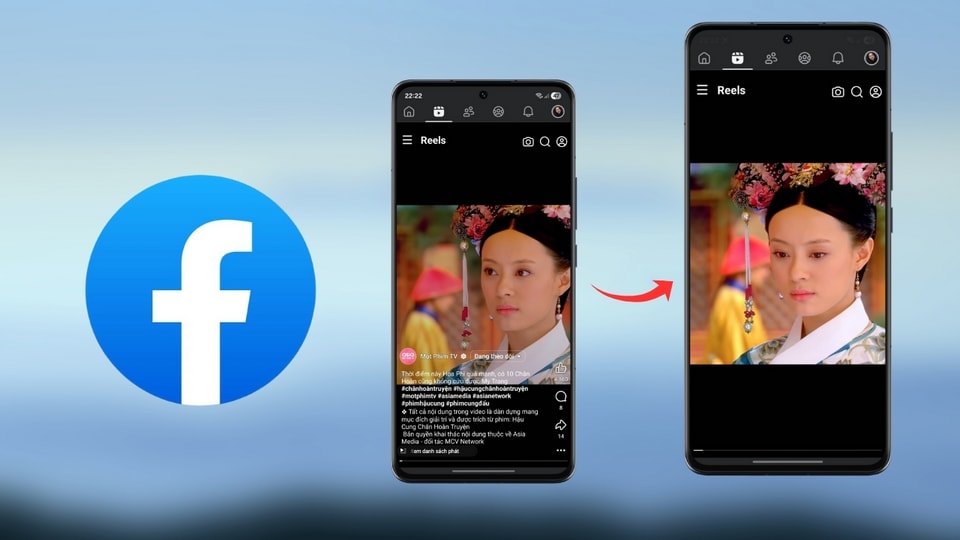
Steps to hide Facebook video descriptions using Clear Mode
To fully enjoy the video without being distracted by text, you can use the Clear Mode feature by following these steps:
- Update the app:Make sure your Facebook app is the latest version on iOS or Android to get all the new features.
- Open video:Open the Facebook app and play any video or clip you want to watch.
- Activate the feature:Click on the iconellipsisat the bottom of the video.
- Select Clear mode:In the menu that appears, select the item.Clear mode.
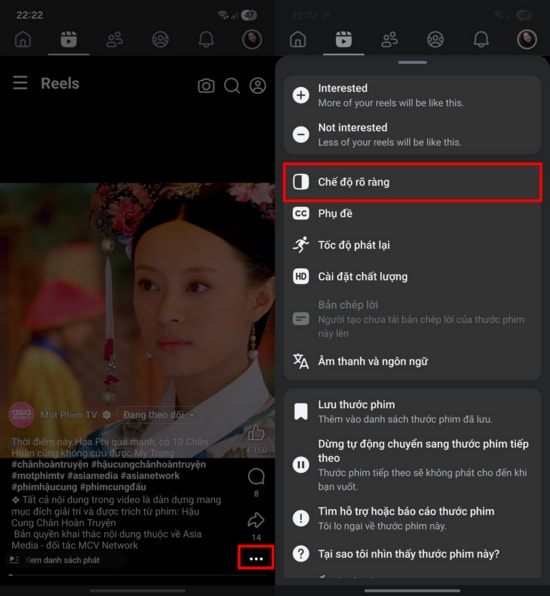
The benefits of hiding video descriptions
Hiding the description only affects the text displayed overlaid on the video. The entire video's original image, sound, and content remain intact and play normally. This makes the frame cleaner, especially useful when users want to take screenshots or focus on subjects at the bottom of the video.
Additionally, if users want to review the introductory information, they can turn this feature off at any time so that the description appears as it did. This is an optimal solution for videos with overly long captions or containing too many hashtags that are visually distracting.

Hopefully, this little tip will help you enjoy relaxing moments and easily follow your favorite content on Facebook without being bothered by lengthy status updates.


