
How to change your Zalo ringtone to your favorite song on your phone.
Zalo users can now easily change the default call notification sound to popular songs from Zing MP3 or system ringtones to personalize their experience.
Zalo is one of the most popular messaging and calling apps today. However, the default ringtone can sometimes be boring or make it difficult for users to distinguish their calls in public places. To add a personal touch, you can change your ringtone by following the instructions below.

Detailed instructions on how to change your Zalo ringtone.
The process for changing call notification sounds on Zalo is similar on both Android and iOS (iPhone) operating systems. Users simply need to follow these three basic steps:
Step 1: Access the call settings.
First, open the Zalo app on your device. On the main screen, select the option.Individual(the person icon in the bottom right corner), then tap the icon.Setting(gear icon) in the upper right corner. Next, find and select the item.CallTo begin the setup process.
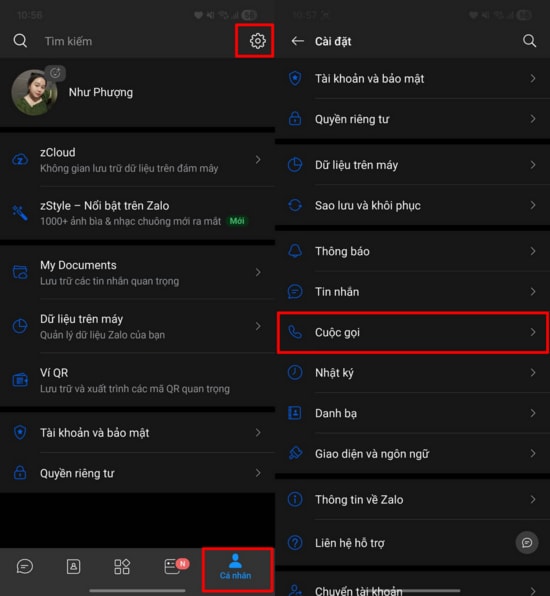
Step 2: Select the Ringtone feature
In the call settings, select the option.RingtoneHere, the system will provide options for you to change the notification sound style when you receive an incoming call.
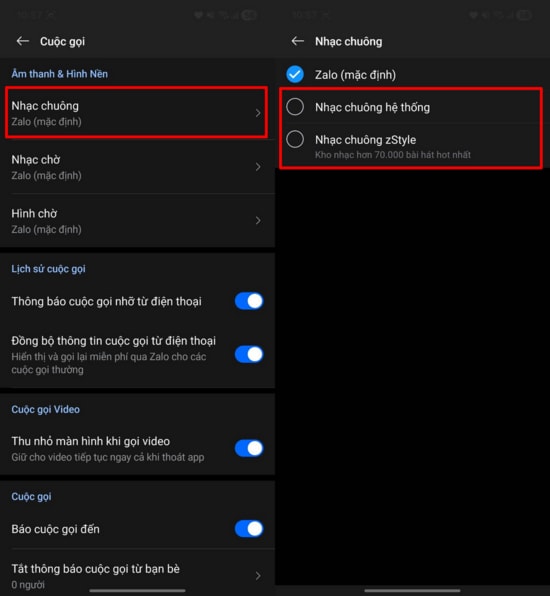
Step 3: Choose your favorite song or system sound.
At this point, you have two main options for setting a new alarm sound:
- System ringtone:Use the default sounds available on your phone. This list will vary depending on the brand and model of your phone.
- ZStyle (Zing MP3 Music Library):Allows you to use your favorite songs as call ringtones.
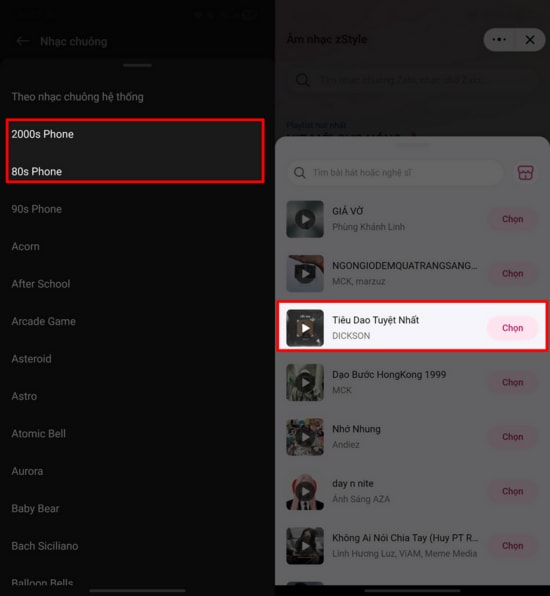
Important notes when setting up
To ensure a smooth ringtone change process, users need to understand some of the application's service regulations:
- Differences in equipment:The number and melodies of system ringtones differ between Android and iPhone devices.
- Service fee:Specifically for the music library on ZStyle, this is a paid feature. Users need to subscribe to monthly or annual service packages to access and use songs as ringtones.
Personalizing your Zalo ringtone not only brings a fresh look but also helps you be more proactive in recognizing incoming calls. With just a few simple steps, you can have your favorite melodies to replace the familiar default notification sound.


