
How to enable the new Run dialog box interface on Windows 11
Microsoft has officially revamped the Run dialog box after more than three decades. Discover how to use the ViveTool to experience the modern interface early on the Windows 11 preview.
After nearly 30 years of almost no change, the Run dialog box – a familiar tool for Windows users – is receiving a major interface upgrade. Microsoft is testing a more modern design for this feature on the latest builds of Windows 11. Although the feature remains hidden by default, users can enable it early through specific technical steps.
The transformation of a long-standing icon on Windows.
The Run dialog box is one of the core and most recognizable components of the Windows operating system. For advanced users and system administrators, the keyboard shortcut...Windows + RIt's the fastest way to access system commands, open applications, or folders. Since its launch, its interface has retained a classic style, creating a contrast with the modern Fluent Design language of Windows 11.
In the Dev and Beta testing phases, Microsoft has begun integrating a new, cleaner, and more consistent Run interface. However, because it is still under development, the company has not officially made it accessible to all users. To experience it, users need to use a third-party tool called ViveTool to unlock hidden feature IDs.
Steps to activate the new Run interface using ViveTool
Activation requires users to be running the Windows 11 Insider build (Dev or Beta channel). Below are detailed instructions on how to proceed:
Step 1: Prepare the ViveTool
First, you need to download the ViveTool from the official GitHub page. This is an open-source tool that allows you to interfere with features under development in Windows.
- Access the ViveTool GitHub page and download the compressed file.ViveTool-vx.xxzip.
- After downloading, double-click to open the file using File Explorer.
- SelectExtract all(Extract all files) and pressExtractTo extract the tool to a folder on your computer.
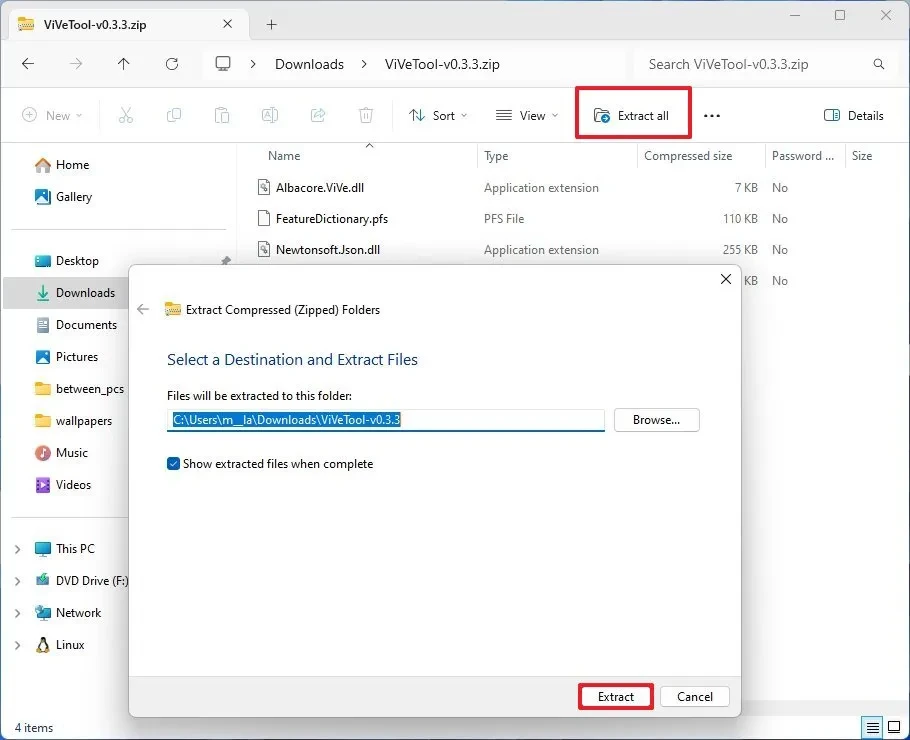
Step 2: Use Command Prompt to activate the feature ID.
Once you have the tools, you need to execute the technical commands to change the system configuration:
- Open the Start menu, searchCommand Prompt, then selectRun as administratorTo run with administrator privileges.
- Use the command
CDTo navigate to the folder where you just extracted ViveTool (for example:cd C:\Users\TenBan\Downloads\ViveTool. - Enter the following command to activate the component IDs of the new Run dialog box:
vivetool /enable /id:58381341,58527096,57156807,57259990
Press Enter and restart your computer for the changes to take effect.
Step 3: Enable the feature in System Settings
After your computer restarts, you need to perform one final step in the setup process:
- Openadjusting(Setting).
- Go to the sectionSystem(System) and select pageAdvanced(Advanced).
- Find and turn on the switch at the sectionRun dialog.
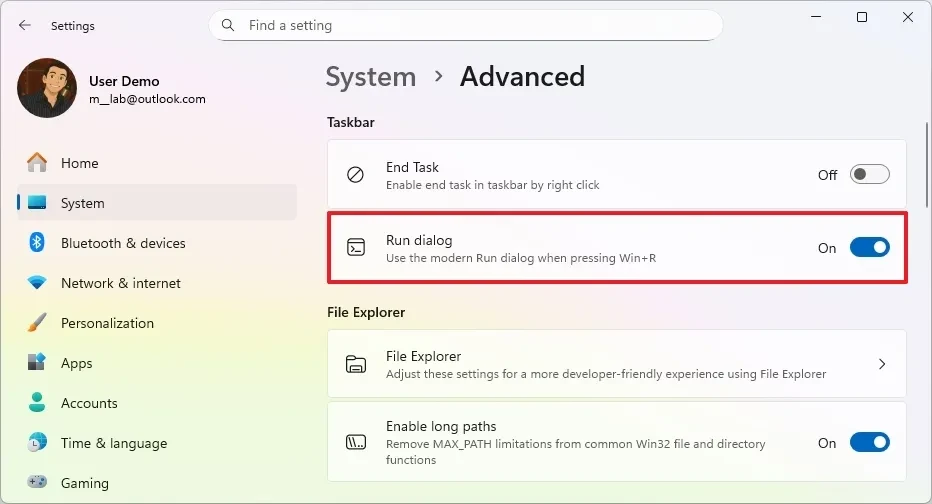
Results and important notes
Once you have completed the steps above, each time you pressWindows + RYou will see a Run dialog box with rounded corners, a Mica blur effect, and a font that matches the entire Windows 11 system.
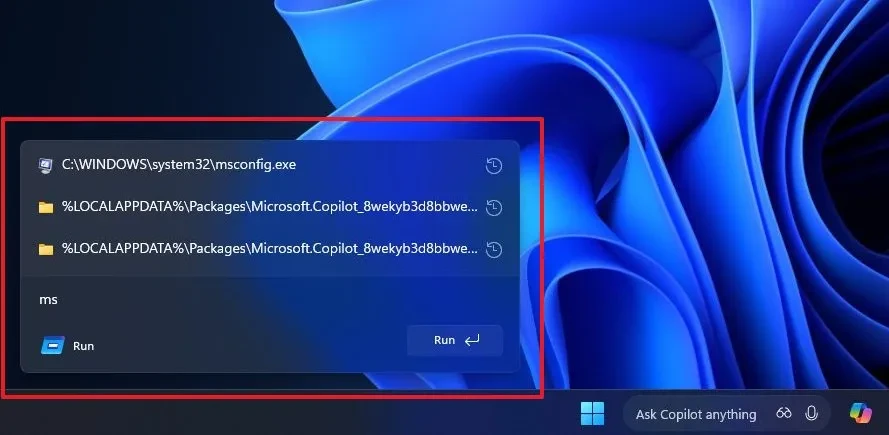
Although the core functionality remains unchanged—still used to run commands and open applications—the aesthetic improvements make the user experience more seamless. However, since this is a hidden feature in the beta version, users should be aware:
- Stability:Enabling hidden features may lead to some minor errors or unexpected system conflicts.
- Tool copyright:ViveTool is not official Microsoft software, so it should only be used on test devices or devices where data has been backed up.
- Reversible:If you want to revert to the old interface, simply replace the command.
/enablewall/disableOpen Command Prompt and restart.
Microsoft has not yet announced an official release date for the new Run interface on stable versions of Windows 11. However, given its appearance in the Dev and Beta channels, it is expected that users worldwide will soon receive this update in upcoming Feature Drops.


