
How to check if your smartphone supports 4G.
Vietnamese mobile network operators are racing to provide 4G mobile data services. Although most of us now use smartphones, unfortunately, many users don't know whether their device supports 4G or not.
In fact, 4G connectivity chips are quite inexpensive, so manufacturers have long supported this connection on many mid-range and higher-end smartphones, and some budget phones also support it. However, not all phone models support it. Therefore, to accurately determine if your phone supports 4G, try some of the methods below:
Method 1:
On your phone > open the phone dialer >Dial *#06#The device will display the IMEI number. Enter this IMEI number into imei.info. Information about the device will then be displayed, allowing the user to check if the device supports 4G.
 |
| Enter your phone's IMEI number in the red box to check its information. |
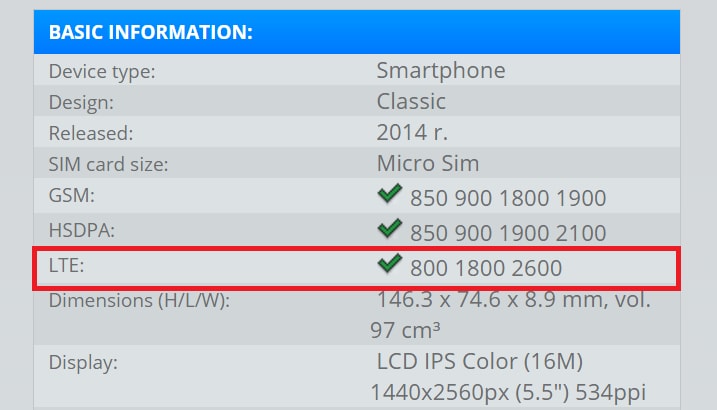 |
| If the device supports 4G, similar information will be displayed in the red box. |
Method 2:
Check the product specifications from the manufacturer or the websites of authorized distributors. These sites usually have complete information about the machine model and the network specifications it supports.
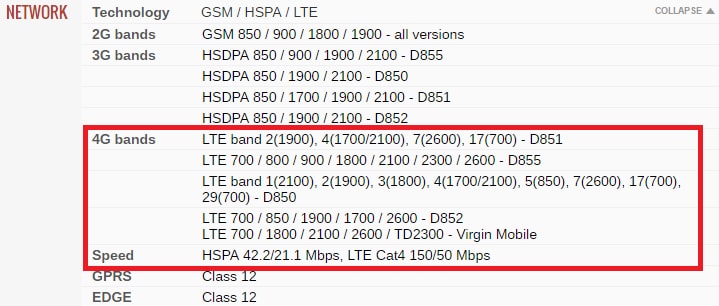 |
| These are the specifications of a 4G-enabled device, as found on the gsmarena website. |
Method 3:
It's possible to check directly on your mobile device; however, note that some phones, despite supporting 4G, may not show this information when checked directly in the device's software (for example, the international version of the LG G3).
You can test this by following the instructions on your phone model; if you see "4G" or "LTE," it means the product supports 4G networks. For example:
+ Samsung (S6 Edge): Settings > Mobile networks > Network mode > LTE/WCD-MA/GSM.
+ iPhone (6/6 Plus): Settings > Cellular > Voice & Data > LTE
Nokia Lumia 930: Settings > Mobile network + SIM > Highest connection speed > 4G
+ Blackberry (Passport): Settings > Network and connections > Network mode > 4G&3G or 4G&3G&2G.
Note
- To use 4G, users not only need a 4G-compatible device but also need to register and activate 4G mode on their device.
- Actual network speed depends on many factors such as location, network provider, data plan, and importantly, the capabilities of the device (smartphone, tablet, etc.).
- To ensure optimal usability, users should choose devices officially distributed in Vietnam instead of imported goods, as those products may be designed specifically for foreign network providers and may not be compatible with use in Vietnam.
Below are some popular smartphone models that support 4G in Vietnam:
Apple
Starting with the iPhone 5, Apple integrated a receiver chip that supports the 4G LTE band. Therefore, iPhone models that are not too old will be able to use 4G.
HTC
Top-of-the-line models like the HTC 10, HTC One M9, and HTC One A9 all support 4G LTE connectivity. In addition, many other models are also equipped with this high-speed network connection, such as the HTC Desire 626, HTC One ME, and HTC Desire 826 Selfie.
Samsung
Many Samsung phone models also support 4G, such as: Samsung Galaxy Note 5, Galaxy A9, Galaxy J5, J2, S6…
Sony
Sony was one of the first manufacturers to equip its Xperia smartphones with 4G LTE connectivity, from mid-range to high-end models such as the Sony Xperia XA, Xperia M5, Xperia X, and Xperia XZ.
According to VnReview
| RELATED NEWS |
|---|


