
How to download Threads videos to your iPhone, Android phone, and computer extremely quickly.
This guide provides detailed instructions on how to download videos from Threads to your device via intermediary websites and supporting applications, ensuring high-quality images and safety.
Downloading Threads videos to your computer, Android, or iPhone essentially involves obtaining the link (URL) of the post and using an intermediary tool to decode it into a high-quality MP4 file. This method allows users to save their favorite content without needing to perform complex system cracking procedures.
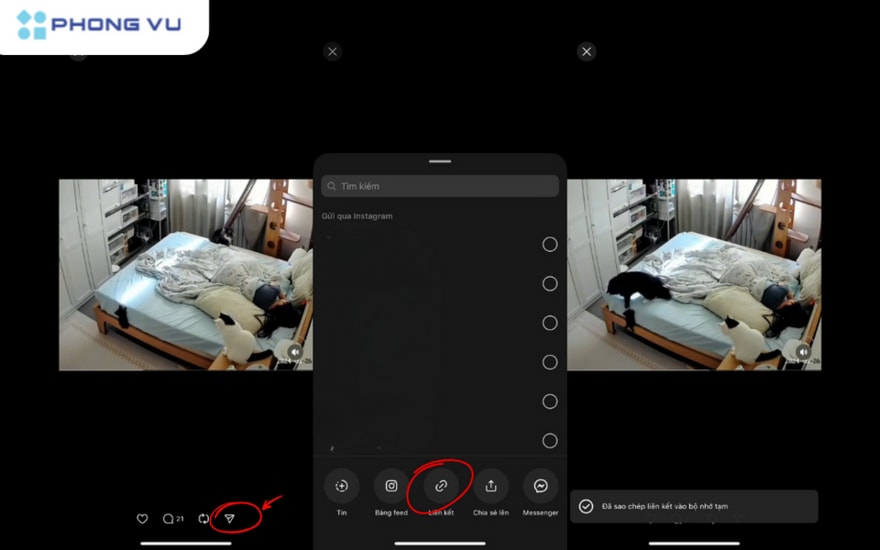
How to get video links on the Threads platform
To begin, you need to obtain the URL of the article containing the video. This is the most important step and applies to all devices:
- On a computer browser:You can click directly on the article to open it on a separate page, then copy the entire address from your browser's address bar.
- On the mobile app:Click on the iconpaper airplane(The share button) is located below the video, then select the command.Copy link.
Download Threads videos to your computer using a browser.
When using a computer, the quickest way is to utilize free online threading services like sssThreads, Snapvn, or ThreadsMate. You just need to follow these three steps:
- Access one of the Threads websites that supports video downloads.
- Paste the copied link into the search box and press the button.Download.
- The system will offer resolution options from HD to Full HD. You select your desired quality level, and the MP4 file will be automatically saved to the folder.Download.
In addition, if you frequently store videos, you can install extensions such asWalletOn Chrome, this extension integrates a download button directly next to the article, saving you time switching tabs.
Instructions for use on Android phones
Android users have a high degree of flexibility in choosing between a web browser or a dedicated app:
- Use a browser:Open Chrome and use the same online websites as you would on a computer. The downloaded videos will be in your album.Downloadof the Photo Library.
- Use the app:Keyword searchVideo downloader for Threadson Google Play. After installation, the app usually automatically detects the link in the clipboard and allows you to download it immediately.
How to save Threads videos to the Photos app on iPhone
iOS's security mechanism requires users to take one small extra step to save videos to the main library:
- Use a browser.SafariAccess a website that supports video downloads and paste the link.
- Confirm the file download when the dialog box appears. Monitor the progress using the green arrow icon in the corner of the address bar.
- Open the video in the sectionDownload, tap the share icon in the bottom corner of the screen and selectSave video(Save Video).
Additionally, setting up keyboard shortcuts such asR downloadIt's an advanced solution that automates the entire process with just one tap from the sharing menu.
Important safety and security notes
Most free video download services are supported by advertisements. Therefore, users should be aware of this:
- Avoid pop-up windows:Absolutely do not click on strange notifications such as virus warnings or gambling ads. If you are redirected, close that tab immediately.
- Download limit:Some websites may limit the number of videos or throttle bandwidth per day. In this case, you may need to watch a short advertisement to unlock more downloads.
- Verify the origin:Only use reputable websites and apps to protect your personal data on your device.


