
Warning: Extremely high risk of fire and explosion when charging laptops on beds and sofas: Mistakes to avoid immediately.
The recent MacBook charger explosion in an apartment building serves as a warning about the habit of placing computers on fabric surfaces. Experts strongly advise against charging devices in these two locations to ensure safety.
Many users have a habit of bringing their laptops or MacBooks to bed or on the sofa to work or entertain themselves for convenience. However, a recent MacBook charger explosion in an apartment building has proven this to be an extremely dangerous habit, posing a serious fire hazard.

Why should you absolutely never charge your laptop on the bed or sofa?
Technically, laptops are designed to draw in cool air from the bottom and expel hot air from the sides or back. When placed on soft surfaces like mattresses, pillows, or sofas, the entire cooling system is almost completely blocked. Heat cannot escape, causing the internal temperature to skyrocket in just a few minutes.
When lithium batteries overheat beyond safe limits, a "thermal runaway" (a chain reaction causing battery fires and explosions) can occur at any time. Even more concerning, bedding and fabrics are extremely flammable materials. When an incident occurs in an enclosed space like a bedroom, the fire can quickly ignite and spread, posing a particular danger at night when users are asleep.
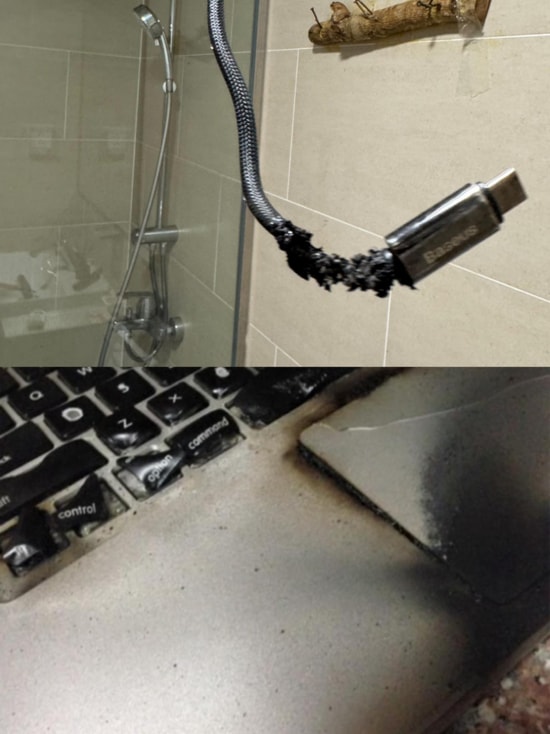
Principles of safe laptop usage and charging.
To protect lives and property, technicians advise users to follow these safety rules:
- Use a flat, hard surface:Always place your laptop on a wooden table, glass table, or other sturdy shelf to ensure there is ample space underneath.
- Use a specialized stand:If you must use it in bed, you will need a specialized stand or a support with ventilation slots to create space for the air vents.
- Never leave the charger on the mattress:While charging, the charger generates a significant amount of heat; placing it on a fabric surface will cause heat buildup and lead to an explosion.
- Use genuine accessories:Prioritize using the charging cable that comes with the device or from reputable brands, ensuring it has the correct power rating.
- Avoid charging overnight:Avoid leaving the charger plugged in continuously when unsupervised.

Dangerous signs that require unplugging the charger immediately.
Users should pay special attention and stop using the machine immediately if they notice any of the following unusual signs:
- The laptop or charger gets so hot that it can cause burns when touched.
- There is a strange burning smell coming from the equipment or wiring.
- The device keeps shutting down automatically, or the charging cable is deformed or discolored.
When encountering these situations, immediately unplug the charger, turn off the device, and move it to a well-ventilated area, away from flammable materials. Then, take the device to a reputable repair center for inspection; absolutely do not attempt to plug it back in to avoid unfortunate risks.


