
iPhones have a new feature that helps detect fraudulent activity.
Apple has just added a Fraud Risk Detection feature to iOS 27, helping iPhone users identify signs of fraud while making transactions.
In iOS 27, Apple added a new layer of protection called Impersonation Risk Detection, to help users identify ongoing social engineering scams.
Non-technical fraud is a type of scam where fraudsters impersonate banks, government agencies, or acquaintances to pressure victims into performing actions such as transferring money, logging into accounts, or changing security information.
Unlike technical attacks, where hackers use technical means to crack passwords or bypass two-factor authentication (2FA), non-technical phishing attacks exploit the user themselves. Once the victim is persuaded and voluntarily completes the transaction, traditional security measures may not detect the anomaly.
How does the Impersonation Risk Detection feature work?
When using a compatible app and performing sensitive actions, such as making a payment or changing a password, the app may ask the iPhone to assess the level of risk.
The system analyzes factors such as interaction patterns, timing, usage context, and some basic sensor data to identify anomalies. The analysis is performed using the necessary data on the device.
The results are returned to the application in one of three categories:
- Unknown: No evidence of suspicious activity was detected. However, this does not mean the activity has been confirmed as safe.
- Medium: Some suspicious signs detected.
- High: Detects serious suspicious signs.
It's worth noting that Apple doesn't directly decide what the app does with the results. Depending on the design, the app might require user identity verification, delay the transaction, or display a warning before allowing it to proceed.
The impersonation risk detection system is designed to limit the sharing of personal data.
Apple states that it does not analyze content in Photos, Messages, or Mail to create risk ratings. Apps requesting ratings also only receive risk results, rather than the background data used to generate those results.
However, this mechanism doesn't mean Apple is completely unaware of any related information. According to Apple's privacy documents, when an app requests a review, Apple may know the type of action the user is performing, such as logging in or making a transaction, but may not know which specific app requested it or the content of that activity.
How to enable the Impersonation Risk Detection feature
This feature doesn't automatically protect all apps; it only works with supported apps. To enable the feature, users should do the following:
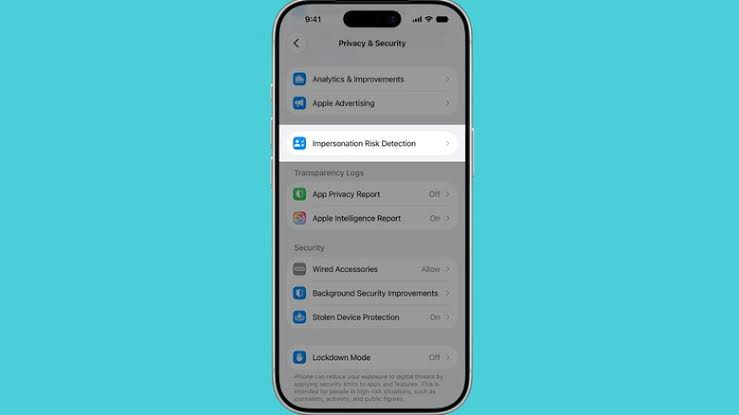
Settings → Privacy & Security → Impersonation Risk Detection → Turn on “Share with app developers”.
Users can also see which apps have requested risk assessments and why, and adjust access permissions for each app.
Apple notes that if someone is calling or texting and asks you to turn this feature off, it could be a suspicious sign. Notably, the change to this setting may take up to 24 hours to take effect.
Fraud detection is an additional layer of protection, not a replacement for other security measures such as two-factor authentication, using strong passwords, or independent verification before transferring funds.
Apple has not yet released a complete list of apps that support this feature. Therefore, enabling the feature does not mean that every transaction on an iPhone will be monitored.
The key feature of this technology lies in shifting the security focus from "preventing intruders from bypassing the system" to "detecting when users are being manipulated." In the context of increasingly sophisticated impersonations of banks, authorities, and relatives, this could become an important layer of defense alongside traditional security tools.


