
MBR to GPT Conversion Error: A Troubleshooting Guide for Windows 11
This guide provides detailed instructions on how to fix two common errors, 'Disk layout validation failed' and 'Failed to update ReAgent.xml,' when converting a hard drive from MBR to GPT for a Windows 11 upgrade.
Converting a hard drive from MBR (Master Boot Record) to GPT (GUID Partition Table) format is a mandatory requirement for upgrading to Windows 11 and using the modern UEFI interface. However, this process can encounter errors, most commonly "Disk layout validation failed" and "Failed to update ReAgent.xml". This article will provide detailed troubleshooting steps for each case.
Disk Layout Validation Failed
The error "Disk layout validation failed for disk" often appears when running the command.mbr2gpt /validateThe cause could be an unsupported hard drive layout, the drive being encrypted with BitLocker, or a corrupted partition table.
1. Hard drive layout is not supported.
The conversion tool requires the hard drive to have no more than three primary partitions. The MBR standard supports up to four partitions, but Windows needs a free space to create the EFI system partition after conversion. If your drive has four partitions, you will need to delete one unnecessary partition.
To resolve issues related to redundant partitions, follow these steps:
- Open menuStart.
- Search for "Disk Management" and open the application.
- Identify unnecessary partitions, such as a small partition labeled "RAW". Right-click on that partition and selectDelete Volume(Delete Volume).
- Click the buttonYes(Yes) to confirm.

Once complete, restart your computer and try the GPT conversion process again.
2. Disable BitLocker encryption.
If the operating system drive is protected by BitLocker, the conversion process will not be possible. You need to temporarily disable this feature.
- Open menuStart.
- Search for "Control Panel" and open the application.
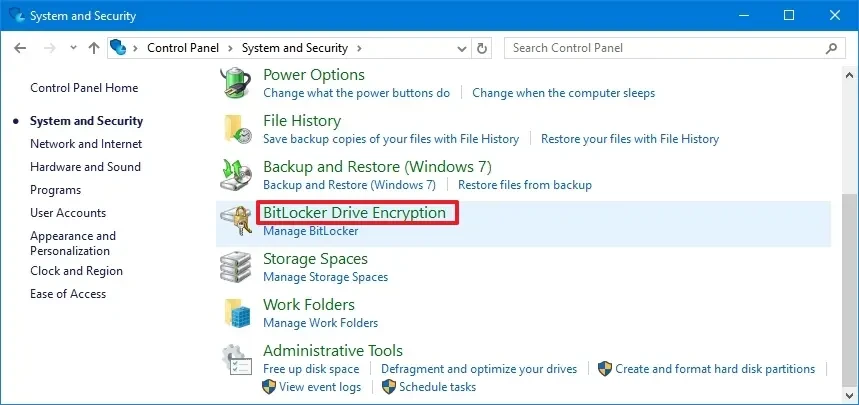
- SelectSystems and Security(Systems and Security).
- Click hereBitLocker Drive Encryption(BitLocker hard drive encryption).
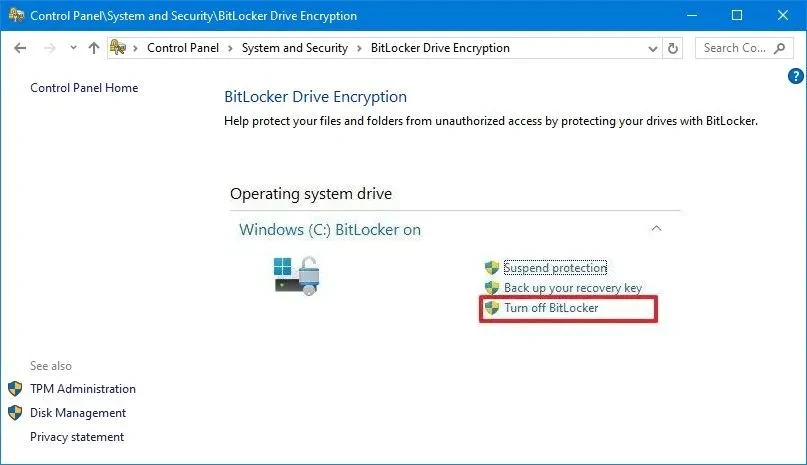
- In the "Operating system drive" section, click the option.Turn off BitLocker(Turn off BitLocker).
- Confirm your selection one more time.
Once BitLocker is completely disabled, you can proceed with transferring the hard drive.
3. The partition table is corrupted.
In case of a corrupted partition table, you can try using the BootRec tool to repair MBR-related issues. However, this tool does not directly repair the partition table. If you suspect a serious problem, the safest solution is to back up all important data to another hard drive and perform a clean installation of Windows 11.
Fix error "MBR2GPT failed to update ReAgent.xml"
If you receive the error message "MBR2GPT: Failed to update ReAgent.xml, please try to manually disable and enable WinRE", this does not necessarily mean the conversion process failed. In fact, the drive may have been successfully converted to GPT, but the Windows Recovery Environment (WinRE) encountered an update issue.
This error occurs when the MBR2GPT tool fails to update the ReAgent.xml configuration file, possibly because WinRE was previously disabled or the recovery partition is missing. You don't need to run MBR2GPT again. Instead, complete the BIOS to UEFI conversion in the system settings, then execute the following commands:
- Open menuStart.
- Search for "Command Prompt", right-click and selectRun as administrator(Run with administrator privileges).
- Enter the following command to disable the recovery environment and press Enter.Enter:
faultc /disable - Enter the following command to reactivate and press Enter.Enter:
responsibility / enable - Finally, enter the following command to check the status and press Enter.Enter:
examination /info
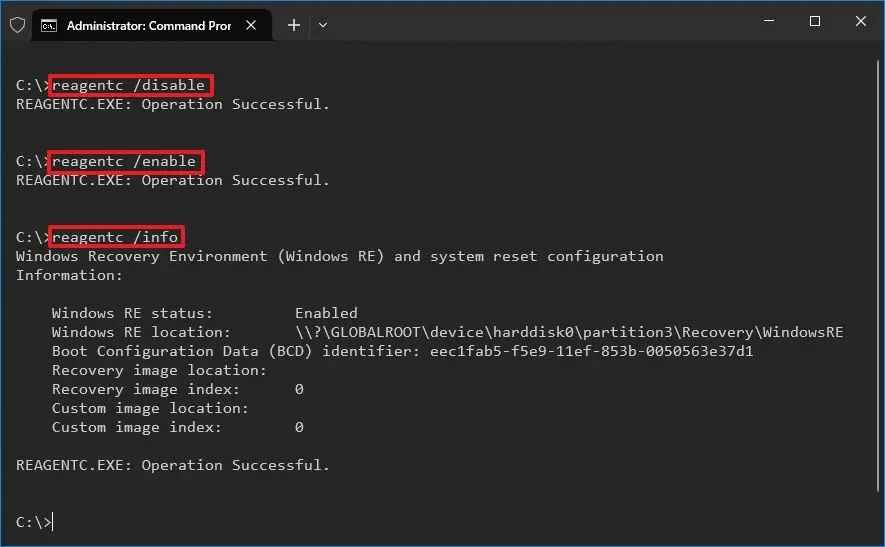
After the commands are successfully executed, the Windows Recovery Environment will function normally, completing the troubleshooting process.
Successfully resolving these errors is a crucial step in ensuring system stability after migrating to UEFI and preparing for the upgrade to Windows 11, taking advantage of the latest security and performance features.


