
A super simple trick to hide AI summaries from Google search results.
Users can remove AI summaries on Google Search by adding special characters to the end of their search keywords to revert to the traditional interface.
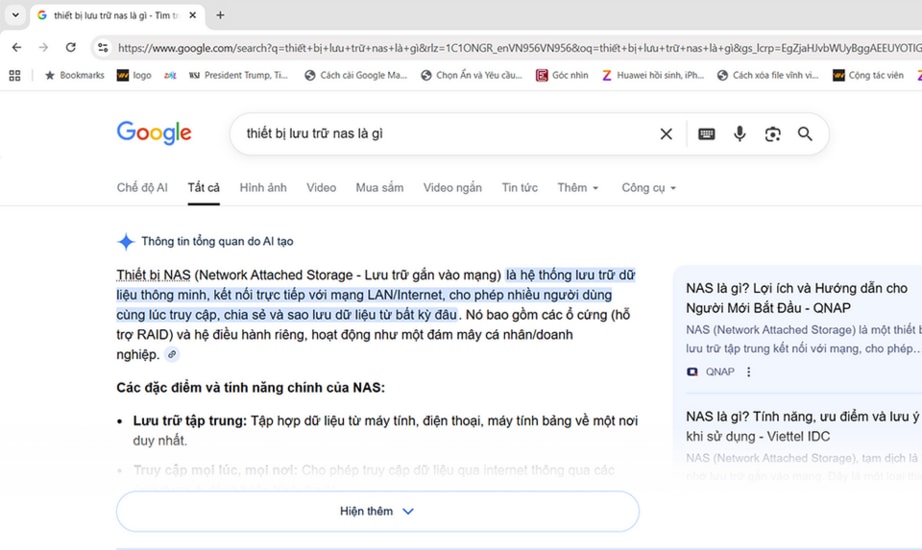
Currently, Google Search has deeply integrated AI-generated results into its search results, causing many users to find it annoying because the summaries take up a lot of space. However, you can completely hide this feature and return to the traditional interface with just a simple keyboard trick.
How to hide AI Overviews on Google
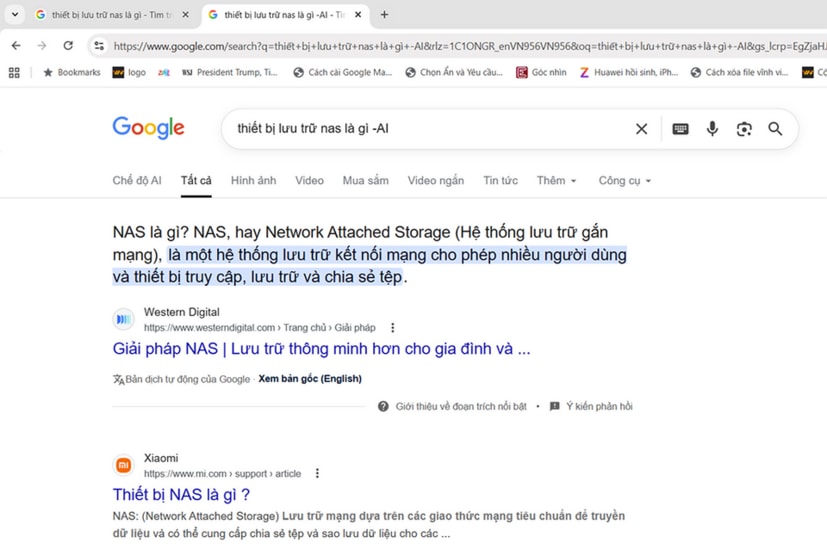
To remove AI-generated summaries, users simply need to add the following character string:"-Who"at the end of their search query. This method forces Google to display regular web results instead of prioritizing the AI overlay at the top.
For example, instead of just typing "what is a NAS storage device", type "what is a NAS storage device -ai". Immediately, the results page will be cleaned up and contain only traditional website links.
Mechanism of action and flexibility of the procedure
Notably, according to an analysis from PC Mag, the effective addition of "-ai" is not due to Google providing an official toggle switch. In fact, these characters are disrupting the algorithm that triggers AI display in Google Search.
Furthermore, you don't necessarily have to use the exact keyword "-ai". Users can replace it with other random characters such as "-i", "-z", or "-xyz" at the end of the search query to achieve similar results. This allows for flexible customization depending on each person's keyboard usage habits.
Note regarding long-term stability
Although this method is currently very effective, there is no guarantee that this trick will last forever. Google may update its algorithm in the future to patch these vulnerabilities in order to prioritize promoting its AI generative tool.
While awaiting an official toggle switch in the settings, this remains the quickest and most effective solution for users to maintain a search experience focused on original content from reputable websites.


