
Notepad on Windows 11 has AI: How to turn it off if you don't need it.
Microsoft integrates AI Copilot into Notepad on Windows 11, requiring an account and using 'credit'. This guide shows you how to disable it if you want simplicity.
Copilot appears in Notepad: An unexpected change
Windows 11 users may have recently noticed the appearance of a "Copilot" menu in Notepad, a tool known for its simplicity. Microsoft has integrated cloud-based artificial intelligence (AI) features, allowing users to perform tasks such as "Rewrite" or "Summarize" text directly within the application.
These additional features also include the ability to change text length, tone, and formatting. However, this change has also sparked controversy as it makes a basic text editor more complex and requires users to log in with a Microsoft account to use it.
How it works and concerns from users.
Using AI features in Notepad isn't entirely free. Microsoft employs an "AI credit" system. Users without a Microsoft 365 subscription can earn up to 15 credits per month, while subscribers can earn up to 60 credits. Each interaction with the AI costs one credit.
This mechanism has raised concerns that it is a strategy to encourage users to subscribe to Microsoft 365 services. Many argue that these AI features are unnecessary for a simple note-taking application and detract from Notepad's original identity.
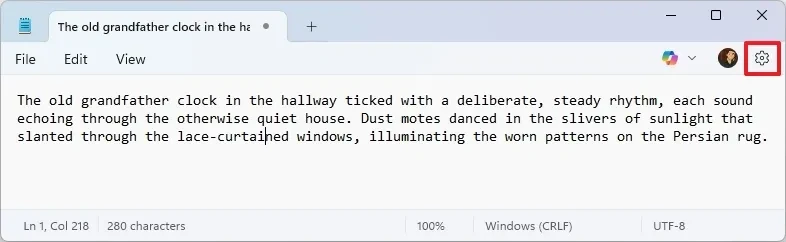
Instructions on disabling AI features in Notepad
If you don't need to use AI tools and want to restore Notepad's clean look, you can easily disable them. This will also remove the Microsoft account login prompt from the application.
Steps to turn off Copilot
- Open the applicationNotepadon your computer.
- Click on the gear icon.Settingsin the upper right corner of the window.
- In the "AI Features" section, find the optionCopilotand flip the switch to the positionTurn off.
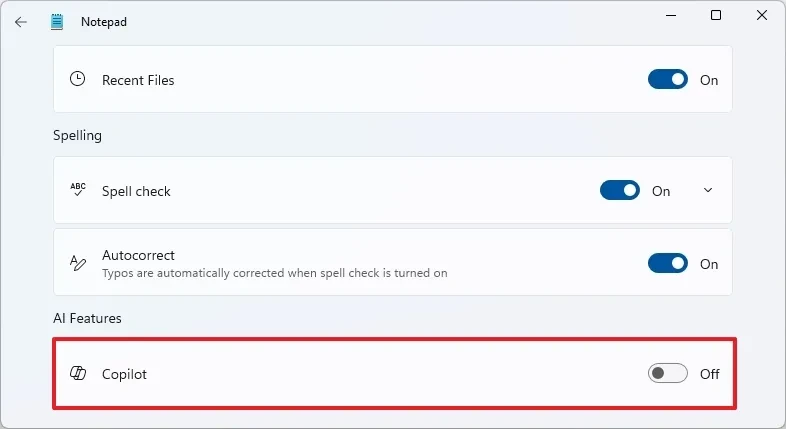
Once completed, features like Rewrite and Summarize will no longer be available in Notepad, resulting in a cleaner interface.
Reactivate as needed.
If you change your mind, you can re-enable the AI features at any time by following the same steps:
- OpenNotepadand go to the sectionSettings.
- In the "AI Features" section, toggle the switch.Copilotmove to positionTurn On.
Note that after reactivating, you may need to sign in to your Microsoft account to use AI features, but this login is not required to use the basic functions of Notepad.
Notepad remains a free tool.
Some users are concerned that Microsoft might turn Notepad into a paid app requiring an account. However, this information is inaccurate. Notepad remains a free note-taking application, and you can use it without an account. Logging in is only required to access the built-in AI features.


