
New iPhone features that users may not know about.
An exciting new feature that Apple has quietly added to the iPhone is the glowing edge effect. Although not yet widely known, this feature promises to deliver a more vibrant and modern visual experience whenever a notification arrives.
Even after using iPhones for years and being familiar with most of their features, users can sometimes be surprised by small but interesting changes, especially as Apple constantly updates and adds new features.
Recently, some users noticed their iPhone screens glowing at the edges and thought the device was malfunctioning. However, this is actually a new visual effect in Apple's Intelligence suite of smart features, introduced with iOS 18.
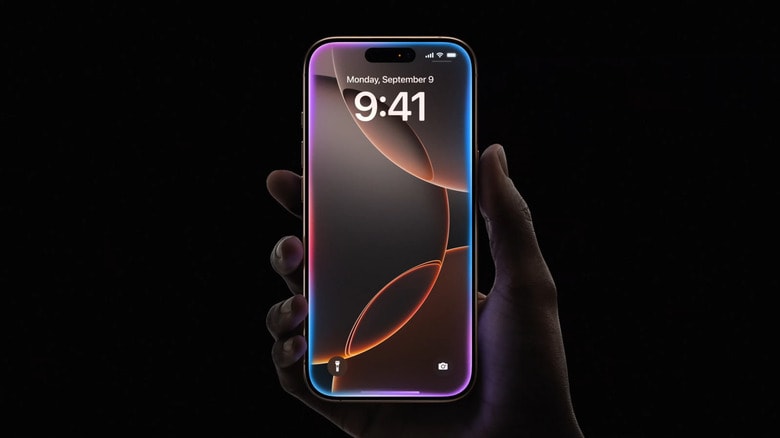
This glowing effect only appears on iPhone models that support Apple Intelligence and are running iOS 18.1 or later. It serves as a visual indicator that Siri, now more deeply integrated with Apple's artificial intelligence, has been enabled.
Depending on how the user invokes Siri, the glowing effect will appear differently. If the side button is pressed and held, the light will spread from the edge of the device into the screen, while if Siri is activated by voice, the light will emanate from the bottom edge of the screen.
This is not just a change in form, but also reflects Apple's new direction in integrating artificial intelligence technology and user experience.
Can you turn off the glow effect on your iPhone?
The glowing effect at the edges of the iPhone screen when Siri is activated is part of the Apple Intelligence feature set, currently only available on the iPhone 15 Pro, iPhone 15 Pro Max, and iPhone 16 series.
This means that only high-end devices will display the rainbow light effect when users call Siri. With older iPhone models, even after upgrading to iOS 18, the Siri interface still retains the traditional globe icon at the bottom of the screen.
If you don't like the new glowing effect and want to turn it off, unfortunately, Apple hasn't yet provided an option to disable it separately. The only solution currently is to disable all of Apple Intelligence, which means you'll lose access to a range of advanced AI features such as writing assistance, notification summarization, intelligent contextual understanding, and ChatGPT integration in Siri.
However, if you still want to turn off the glowing effect and are willing to sacrifice the aforementioned AI features, you can do the following:
- Open the applicationSetting(Settings) on iPhone.
- Scroll down and selectApple Intelligence & Siri.
Flip the switch next to Apple Intelligence to turn it off.
- Confirm by selecting Turn off Apple Intelligence in the dialog box that appears.
Once completed, the glowing effect around the edges of the screen will no longer appear. Note that this does not disable Siri; you can still call the virtual assistant using your voice. However, you will not be able to type text into Siri, a feature that is only available when Apple Intelligence is enabled.


