
Incorrect monitor placement: 5 mistakes office workers need to avoid immediately.
Even a slight misalignment of the monitor can put prolonged strain on the neck, back, and eyes. For office workers, this is a silent cause of aches, pains, and musculoskeletal damage.
The position of the monitor may seem like a minor detail, but it actually plays a crucial role in maintaining proper posture when working or gaming for hours on end. If the monitor is placed too close, too far, too high, too low, or at the wrong angle, the body will be forced to compensate with unnatural postures.
In the long term, this can lead to eye strain, neck and shoulder pain, back pain, and even increase the risk of herniated discs or nerve compression.

Based on ergonomic principles and the practical experience of those who have worked in front of screens for many years, here are 5 common mistakes that many people still make.
1. Do not place the screen directly in front of your face.
Whether you use one or multiple monitors, the basic principle is that the main screen should be placed directly in front of you. Constantly turning your head to the left or right to look at it puts continuous pressure on your neck, causing muscle stiffness and pain.
With a multi-monitor setup, the arrangement should minimize neck rotation. Consider rotating the secondary monitor vertically or stacking the monitors to limit excessive head turning over extended periods.
2. Position the screen too low or too high.
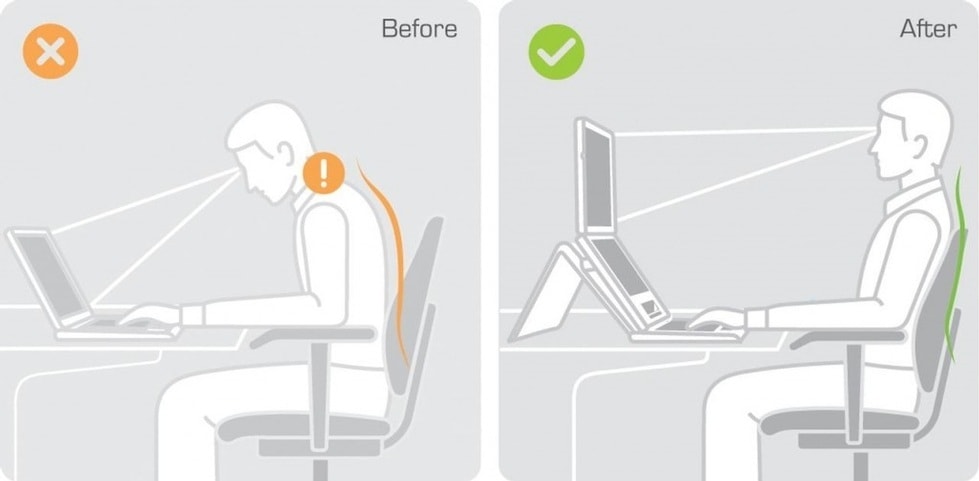
This is a very common mistake. When the screen is positioned too low, you are forced to bend your head down, similar to the posture of "burying your face" in your phone. Conversely, if the screen is too high, your neck will have to be constantly tilted upwards, putting pressure on your cervical vertebrae.
The recommended eye level is between the top edge of the screen and the top third of the screen. This allows the eyes to naturally look slightly downward without having to bend or tilt the head back.
For those who wear bifocal glasses, the screen should be positioned slightly lower and tilted upwards to match the near vision area of the glasses, avoiding the need to tilt the head up too much.
3. Positioning the monitor at the wrong distance.
An inappropriate viewing distance is a direct cause of eye strain. A screen that's too close forces your eyes to constantly adjust; one that's too far makes you squint or lean forward.
With common screen sizes of 21-27 inches, the ideal viewing distance is usually within arm's reach. You can extend your arm straight forward; if your fingertips lightly touch the screen, that's a relatively reasonable distance.
For larger screens, it's a good idea to sit a little further back and adjust the resolution or aspect ratio to ensure the text and content are easy to read without having to strain your neck.
4. Do not adjust the screen tilt.
Many people keep their monitors at their default angle without realizing that tilt significantly impacts eye comfort. Ergonomic experts recommend tilting the monitor slightly, around 10-15 degrees, as the natural viewing angle of the eye is usually slightly downward.
People who wear bifocal glasses may need more adjustment to their prescription, depending on the type of glasses and how comfortable they feel in real-world use.
5. To avoid screen glare.
Ambient lighting is an easily overlooked factor. Placing the screen directly opposite a window or under a strong light source will cause glare, reduce contrast, and force the eyes to strain more.
The best solution is to avoid placing the monitor directly in front of the window. If the position cannot be changed, use curtains, blinds, or anti-glare coverings to reduce light reflection, making it more comfortable for your eyes to work.
In addition to the monitor, the keyboard and mouse should also be positioned at the appropriate height so that the elbows form an angle of approximately 90 degrees and the wrists remain in a neutral position.
In addition, give your eyes regular breaks using the 20-20-20 rule, meaning that for every 20 minutes of screen time, look away at something 20 feet (about 6 meters) for 20 seconds. Also, do some light exercise or change your posture every hour to avoid sitting or standing still for too long.
Adjusting your screen position and getting used to a new posture may feel unfamiliar at first. However, with persistence and in combination with proper exercise and relaxation, you will notice a significant improvement in your neck, back, and eyes.
Paying attention to your monitor's placement not only improves work efficiency or gaming experience, but it's also an investment in your long-term health in the digital age.


