Online personal income tax refund: results available in just 3 days.
A personal income tax refund process with results available in just 3 days is the content stated in the General Department of Taxation's decision on the automated personal income tax refund procedure.
According to the General Department of Taxation, starting in 2025, tax authorities will implement automatic personal income tax refunds. Taxpayers will know the outcome of their refund application within just 3 days.
Automatically generate tax return records.
Recently, the Director General of the General Department of Taxation issued Decision 108/QD-TCT on the process for automatic personal income tax (PIT) refunds. This process stipulates the procedures for tax authorities to handle PIT refund applications from individuals who directly file their tax returns and request a refund on their tax return.
The automated personal income tax refund process includes three main steps:
- Create and receive suggested personal income tax return forms that include a request for a tax refund from taxpayers.
- The personal income tax refund will be processed automatically based on the information provided.
- Post-refund control aims to ensure the accuracy of tax refunds.
Based on declaration data from income-paying organizations and individuals, along with tax registration data, dependent registration data, and an overview of tax obligations, the tax authority's information technology (IT) system will automatically compile the data. This system will compare the indicators on the personal income tax return to determine the taxpayer's declaration obligations and generate a suggested tax return for individuals to directly file their tax returns.
The data aggregation and creation of the suggested tax return form are performed by the tax authority's IT system immediately after the deadline for submitting the personal income tax return of the income-paying organization.
Taxpayers can useeTax Mobile appAlternatively, you can use the Electronic Tax application for individuals provided by the General Department of Taxation to check the information on the suggested tax return form.
- If the taxpayer agrees with the suggested information, they confirm and submit the tax return on the application as required.
- If they disagree, taxpayers can amend the information in the corresponding fields, add reasons for the discrepancies compared to the data suggested by the tax authorities, and submit the final tax return along with supporting documents.
Automatic processing of personal income tax refunds
The administrative procedure processing information system will automatically generate and send:
Announcement regarding the acceptance of electronic tax returns.
Notification regarding the acceptance of tax refund applications.
These notifications will be sent immediately after the system receives the tax return containing the item "Tax refunded to taxpayer".
Subsequently, the automated tax refund system will create the tax refund application and carry out the next processing steps as prescribed.
Prepare in advance for personal income tax refund.
To process a refund of personal income tax already paid, taxpayers must have an account on the General Department of Taxation's portal.
To claim your personal income tax refund online yourself, you need to have all the electronic personal income tax withholding certificates from the companies that paid your income during the tax year.
Detailed instructions on how to file a personal income tax refund application online.
Method 1: Claim personal income tax refund via the General Department of Taxation's information portal.
The personal income tax refund you receive is the amount of overpaid tax after the tax settlement process. The specific steps are as follows:
Step 1: Access the Vietnam Tax website and select the "Individual" section.
Step 2: Choose a login account and fill in all the required information.
Step 3: Select “Tax Settlement” >> Select “Online Filing”
Step 4: Enter the information displayed on the system.
Step 5: Submit the declaration form.
Step 6: Submit the attached documents and tax deduction certificates for personal income tax.
Method 2: Claiming Personal Income Tax Refund via eTax Mobile
To claim your personal income tax refund via eTax Mobile, follow these steps:
Step 1: Open the app and log in to your eTax Mobile account.
Step 2: Select “Request processing of overpayment”
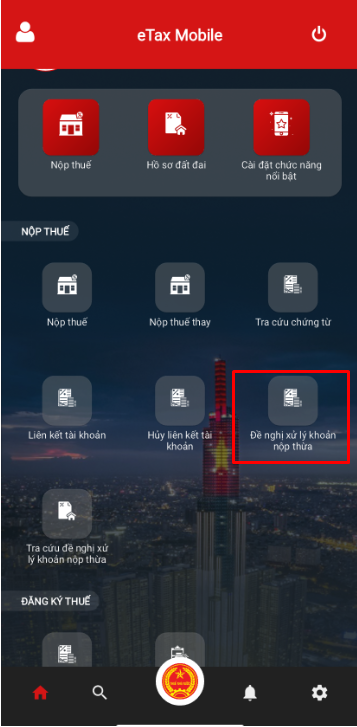
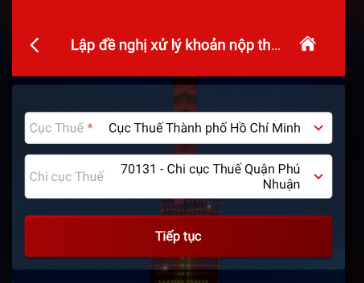
Step 3: Submit your tax refund request.
Select the Tax Department and Tax Branch (if applicable) and select "Continue".
Step 4: Enter the information of the person requesting the processing of the overpaid tax >> Select "Continue"
Note: Fields marked with an asterisk (*) are required.
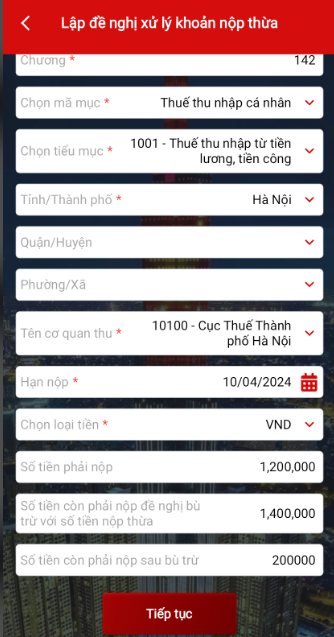
Step 5: Review the information regarding overpaid tax, late payment penalties, and fines >> Select "Continue"
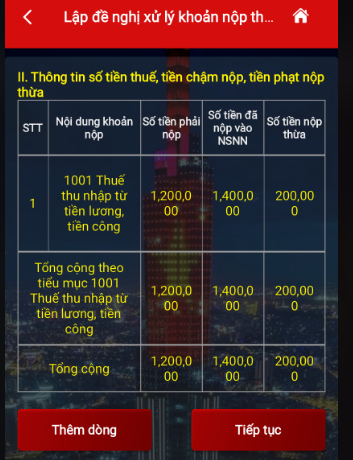
Step 6: Enter the amount due, the remaining amount to be paid (to be offset against any overpayment), the remaining amount after offsetting, and other required information >> Select "Continue"
Note: Fields marked with an asterisk (*) are required.
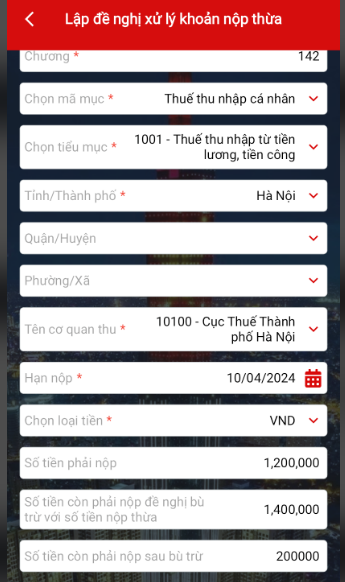
Step 7: Double-check the information regarding the amount requested for processing the overpayment >> Select "Continue"
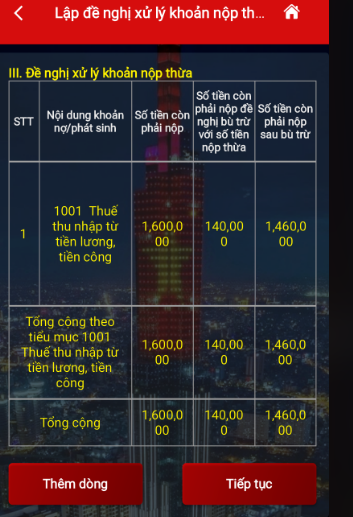
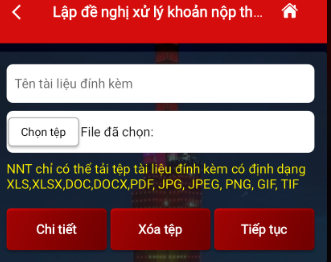
Step 8: Name the attached document and select the tax refund request form >> Select “Continue”
Select the form: 02/QTT-TNCN – Personal Income Tax Final Settlement Declaration (Circular 80/2021)
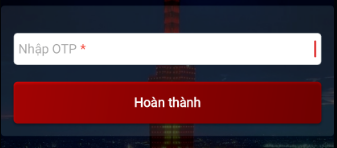
Step 9: Enter the OTP code sent to the taxpayer's phone number >> Select "Complete"