Tips for blocking spam messages on Facebook
Facebook has become fertile ground for spam, advertisements, and scams. With a few simple steps, you can block these spam messages.
Previously, Facebook limited messages to only those from friends on a user's friend list on the social network, but the situation has now changed. Spam messages not only appear in the "Other" section but have also spread to the main message inbox.
With its "friends of friends" spread mechanism, victims don't need to be friends with the spam account to receive dozens of unwanted messages. Additionally, Facebook automatically includes the recipient's name in the message content to increase credibility.
Besides service messages from mobile service providers, Facebook users receive daily advertising messages from many other unwanted sources, such as promotional messages, phone SIM card sales, real estate, cosmetics, and fortune-telling apps.
These spam accounts are often fake accounts used by advertisers, or hacked accounts. These accounts serve as a platform for automated messaging software to send messages to other users.
Therefore, if you're looking for a way to avoid receiving so many spam messages, you can implement the following settings.
First, tap the inverted triangle icon, then select "Settings" in your Facebook account, and then select "Privacy".
In the "Who can contact me?" section, select "Whose messages do I want filtered into my inbox?", then select Edit and click on "Strict Filtering".
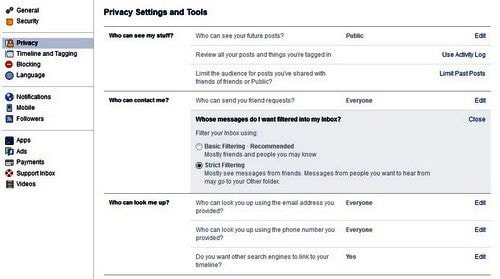 |
| Only friends can send messages to your inbox. |
Now, only those on your friend list can send you messages, while messages from strangers will be moved to the "Other" folder instead of being automatically moved to the "Other" folder as it was initially.
The drawback of this method is that it only filters messages from strangers into the inbox.
Therefore, if a friend's Facebook account is hacked, this feature will not be able to filter messages. Additionally, users may miss some important messages from people they haven't connected with before.
To protect your Facebook account from hackers and various types of viruses and malware that can lead to spamming your friends, please note the following:
- Do not click on links of unknown origin or those designed to attract views or pique curiosity on Facebook.
- Be wary of requests to log in with your password, download files to continue watching videos/content, or view in high quality on websites redirected by Facebook.
- Do not share personal information with unfamiliar or unknown accounts online; it could be a scam.
- Do not participate in or follow instructions from unreasonably misleading giveaway events (shoes, couple shirts, Facebook t-shirts, etc.) on this social network. These are often fake events created by malicious actors to hack user tokens and gain control of the victim's account.
According to PCWorld
| RELATED NEWS |
|---|